ACX7000 ERSPAN and Port Mirroring
Traffic mirroring is a useful method for debugging traffic patterns. The ACX7000 family of products supports both local port mirroring and ERSPAN. This article describes how to utilize these functionalities.
Analyzer
Local Port or remote mirroring are implemented via a software component we call "analyzer". Under this forwarding-options analyzer configuration statement, we will define certain parameters like:
- Input: the traffic collection point
- Output: where the captured traffic will be redirected
- Ingress/Egress: the direction of the traffic we want to capture
Sample Analyzer Configuration
Local Port Mirroring
Port mirroring is supported on ACX7K family products. It allows for the complete ingress/egress traffic of an interface to be mirrored to another local port on the device.
Topology
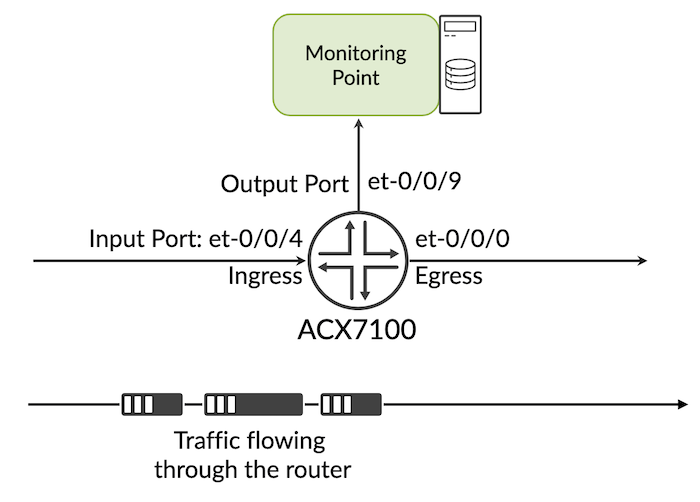
Configuration example:

ERSPAN Remote mirroring
ERSPAN (Encapsulated Remote Port ANalyzer) is basically remote mirroring. This feature allows the capture of packets anywhere across a routed network. It mirrors traffic on one or more "source" ports and delivers the packets to a "destination" port on remote end, via an ERSPAN tunnel.
ERSPAN encapsulates mirrored packets using tunnelling with IP delivery. After a captured packet has been encapsulated, it is forwarded throughout the network across a special Layer 3 tunnel. The data section contains the original mirrored packet.
In the following example, ERSPAN is demonstrated with L2Circuit. However, users can choose to utilize alternative options like EVPN-MPLS, EVPN-VPWS, VPLS, or L2VPN.
Remote Mirroring Topology
Here, we present a straightforward example of the L2Circuit operating between PE1 and PE2, with traffic flowing through it. Our goal is to capture the incoming traffic to the L2Circuit on the ACX7100 device and direct this captured traffic to a Tester connected over the Layer 3 routed network.
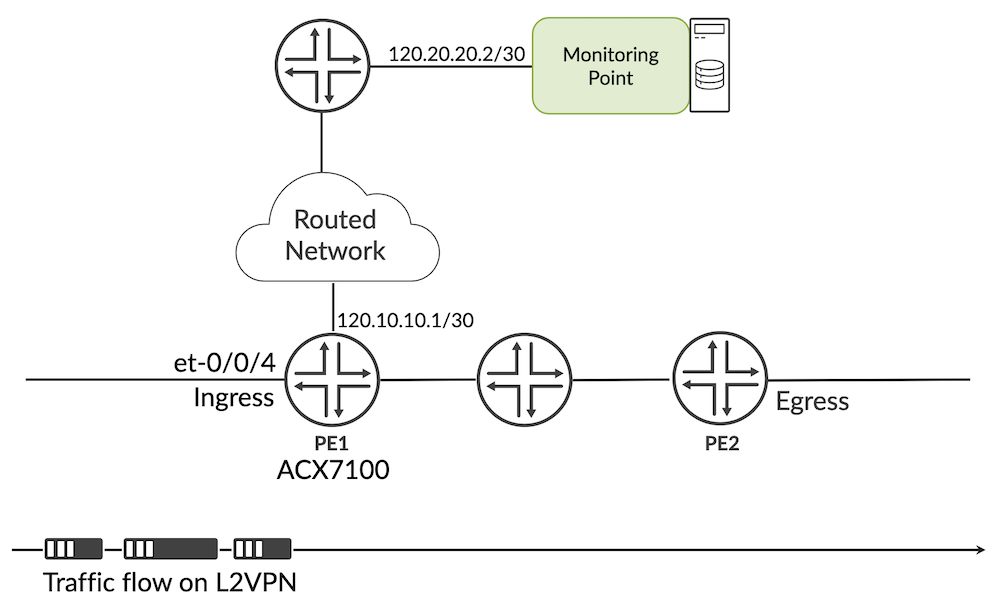
Analyser Configuration
Basic L2 circuit configuration
L2Circuit connections:
Remote traffic Collection on L3 interface should be reachable from the device.
Traffic capture analysis
Here below is the traffic captured on the monitoring point, we can see clearly how actual traffic get cooked up with new L2/L3 headers and actual traffic is encapsulated inside GRE and ERSPAN header. Traffic is destined to 120.20.20.2 which is configured as "output" under the analyzer and source IP is the next-hop IP, in this case: 120.10.10.2.
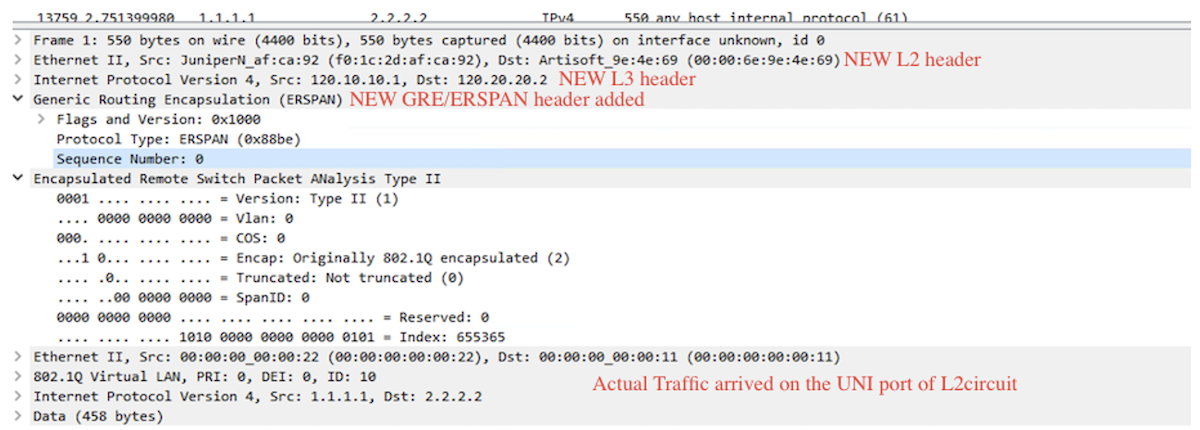
Considerations
Couple of things to know when configuring mirroring on ACX7000 platforms:
- Port Mirror and ERSPAN functionality are available on ACX7K products from 22.4R1 onwards.
- The analyser is configured on IFL (sub-interface), but actual mirroring will happen at IFD (main interface). The user can add et-0/0/0.0 or et-0/0/0.10 in analyzer config, but all packets on this interface et-0/0/0 will be be mirrored.
- Mirrored traffic can be redirect to IPv4 destination only. i.e "output" as IPv4 address.
- Cant apply Analyzer on IRB interface / mirroring on IRB interface not supported.
- Any change in the output configuration (input interface or output host), should be first removed and then re-configured/re-applied.
- If the route to reach mirror destination changes and points to any interface other than the one mentioned in ERSPAN Analyzer config, the configuration must be modified and re-applied accordingly.
- Maximum of 16 ingress and 8 egress mirror instances are supported. If you configure more than what is supported, commit error will be thrown.
- On a single output port, we can configure max 8 ingress/egress instances combined. If you exceed it, a commit error will be thrown.
- Mirrored traffic will not be load balancing if the next hop have multiple paths (ECMP).
- Filter based mirroring is considered as part of our roadmap.
Useful links
Glossary
- ERSPAN: Encapsulated Remote SPAN
- EVPN: Ethernet Virtual Private Network
- GRE: Generic Routing Encapsulation
- IFD: Interface Device (physical interface)
- IFL: Interface Logical (logical interface)
- IRB: Integrated Routing and Bridging
- L2VPN: Layer2 Virtual Private Network
Acknowledgments
Many thanks to Nicolas Fevrier for reviewing the article and providing feedback