Creating Audit Trails with the Apstra Event Log
The Audit trail feature tracks a user's actions while using Apstra and can be very useful in investigating general usage, network outages, and possible suspicious activity.
Introduction
Juniper Apstra automates the creation and management of data center fabrics and is designed to be the central point from which all network changes are made.
What is Audited?
Each of the following is modeled as an audit event within Apstra.
- Login and Logout: including failed login attempts
- Blueprint Commits: changes committed from staged to active blueprint
- Blueprint Reverts: discards changes in the staged blueprint
- Blueprint Deletes: removing an entire blueprint
- Per device config change attributed to the user: This includes any config change that Apstra pushes to any managed device (including Time Voyager). The audit event is attributed to the logged-in user making the change.
View Audit Logs (Event Log)
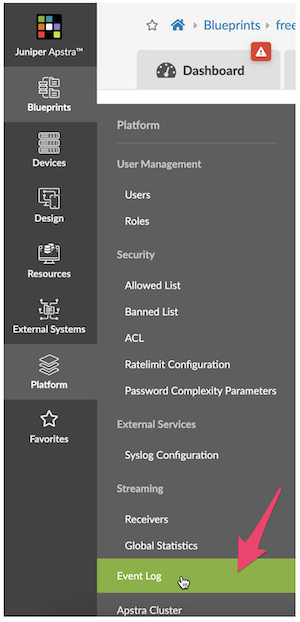
- The Event Logs can be accessed from the Apstra UI - Platform>Event Log, as seen in the screenshot below.
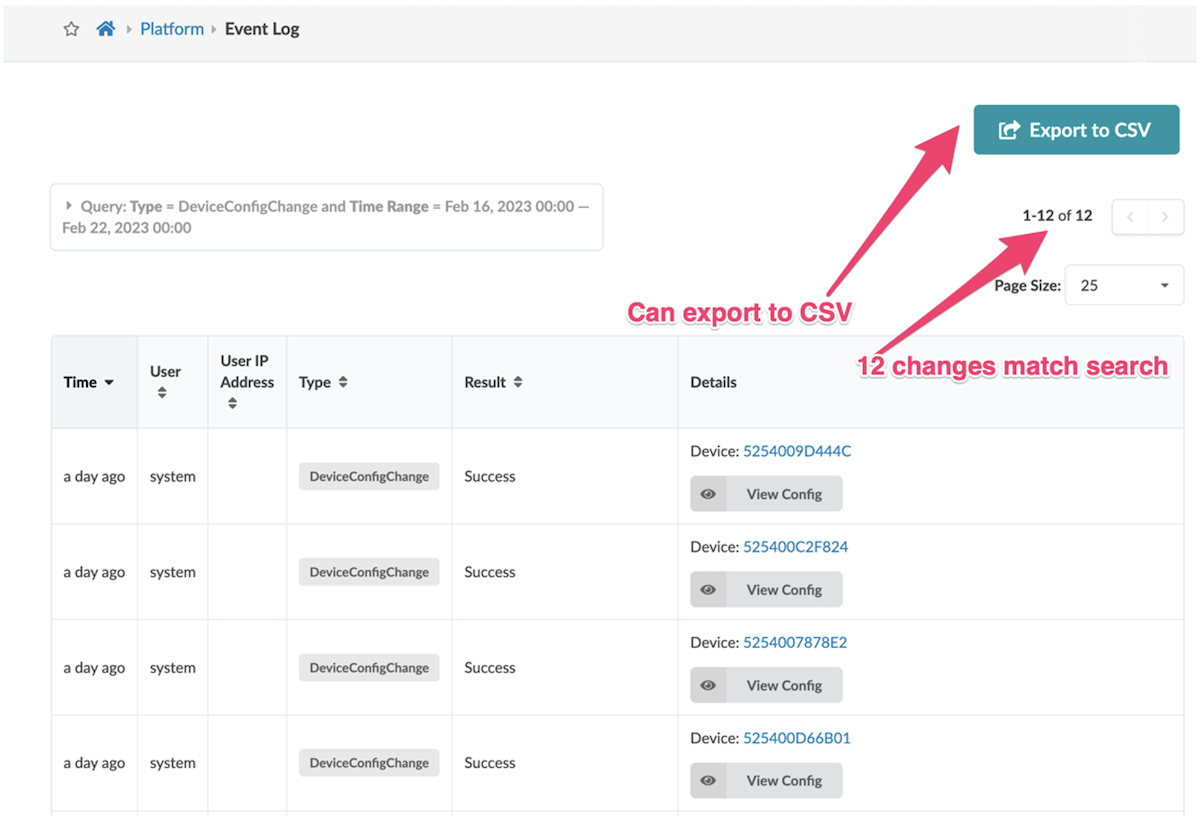
- This view Displays the most recent 25 events in a table. You can change the page size of this table like any other table.
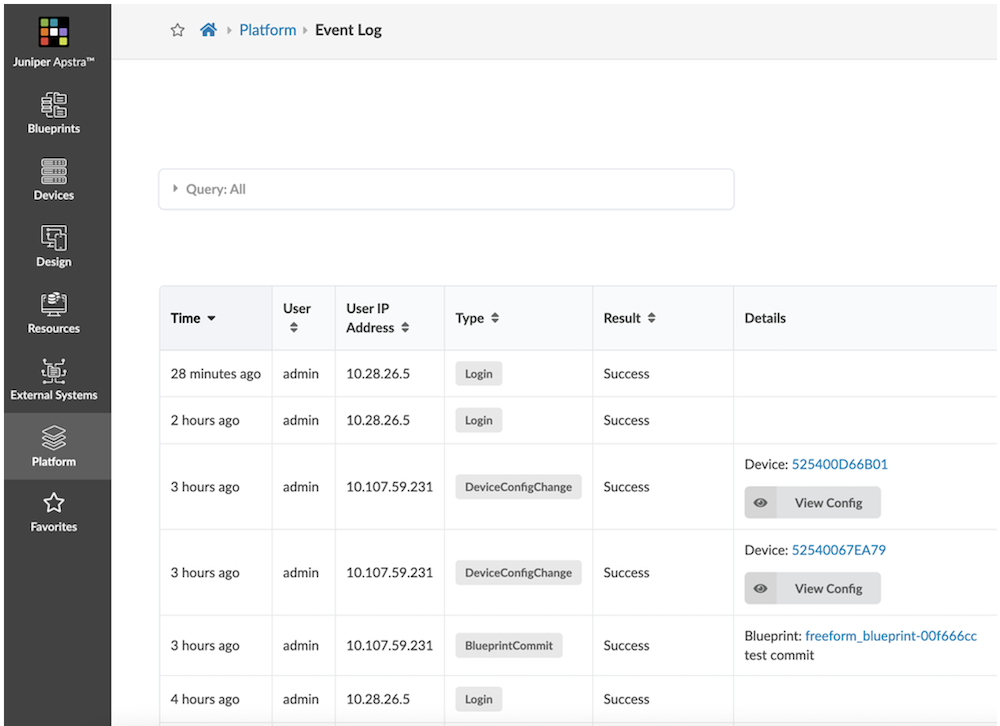
- You can click on paging controls to see additional pages.
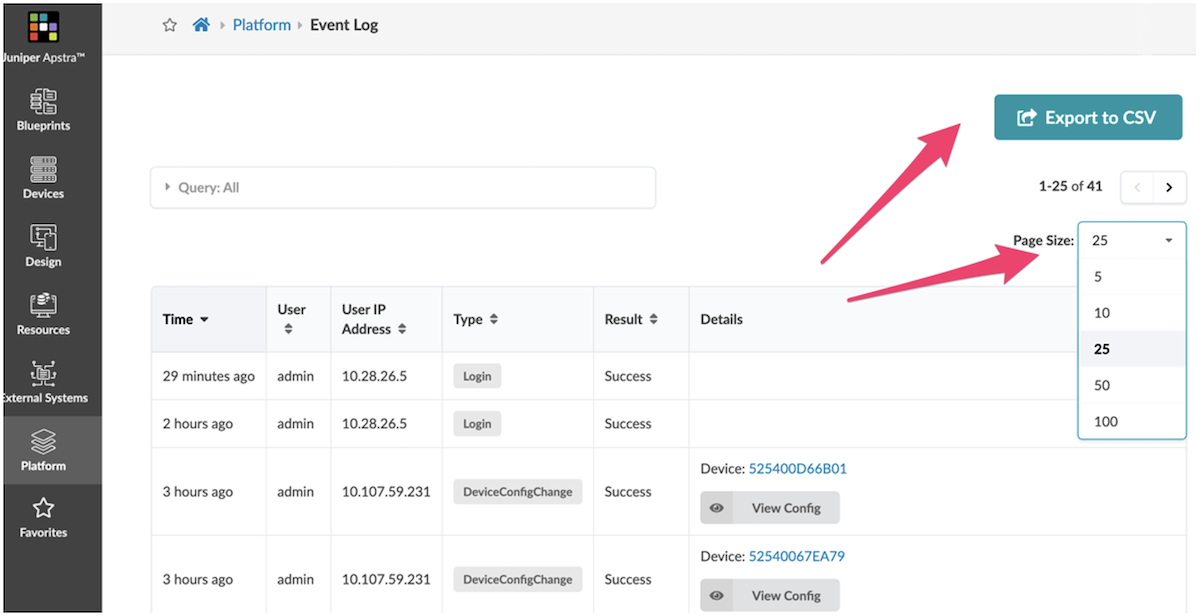
- You can export the logs to a CSV file by clicking the "Export to CSV" button.
Searching Audit Logs
Logs over time fill with many events, which can mask the one you want to see. Apstra provides a query function via the UI or the Rest API, allowing you to search for that important event previously masked or hidden within this log file.
-
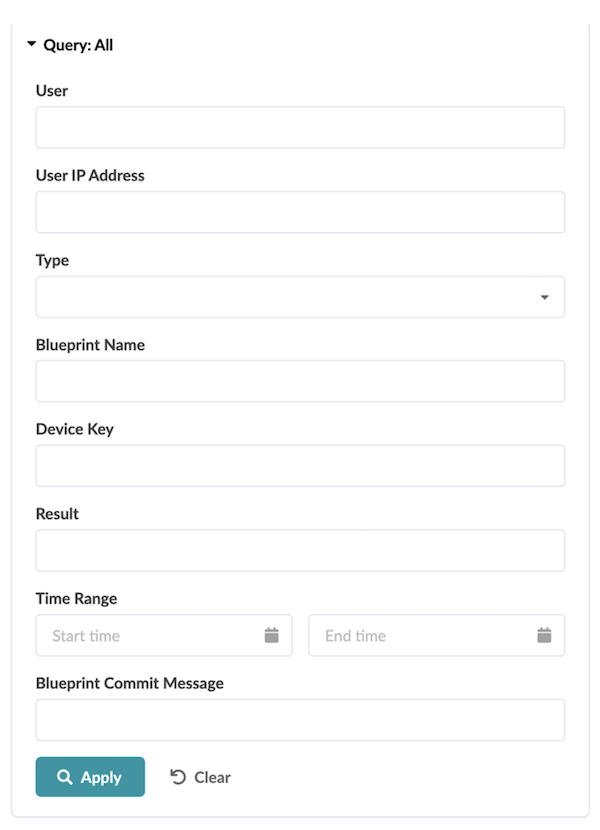
Click on "Query: All," as shown below.
-
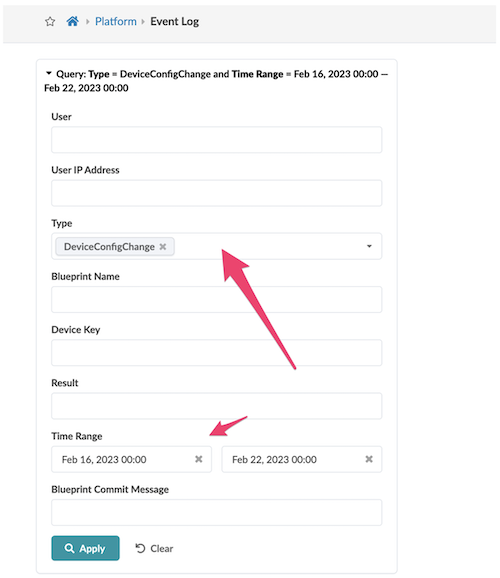
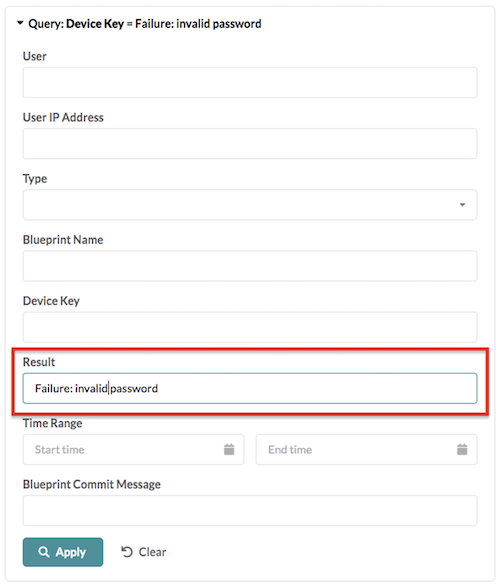
You can search on audit logs by following criteria (any combination is possible, choosing multiple fields returns audit events that match criteria for all fields).
-
a. User
- b. User IP Address
- c. Source IP
- d. Type
- e. Blueprint Name
- f. Device Key
- g. Result
- h. Time Range
- i. Blueprint Commit Message
Search Examples
View all config changes in the past five days
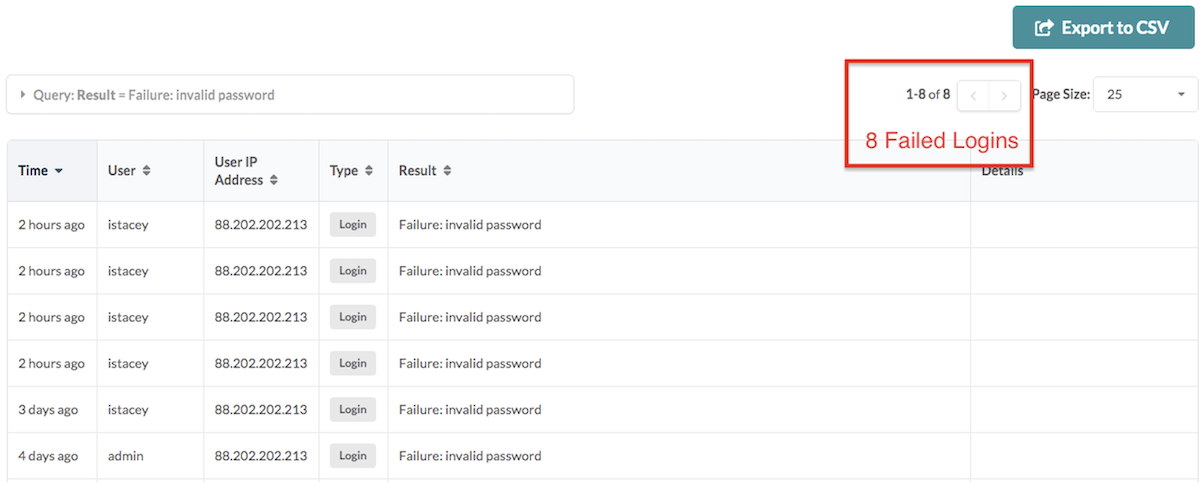
Failed user logins
Audit Log Forwarding via Syslog
As well as viewing the log file via the UI, the log messages can also be sent to an external Syslog server.
Enabling Syslog Server in Apstra UI
Navigate to Platform>Syslog Configuration:
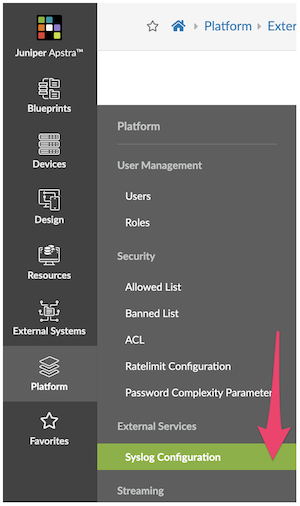
Options:
- Transport protocol (TCP or UDP)
- Remote Syslog IP address
- Remote syslog port
- The facility which will be assigned to forwarded log messages
- Enable Forwarding Audit Logs
- Enable Forwarding Anomalies
Forwarding Audit Logs: What is Audited?
- User login, logout
- Blueprint commits that push changes from staged to active blueprint
- Blueprint reverts that discard changes in the staged blueprint
- Blueprint deletes
- Per device config change attributed to the user. This includes any config change that Apstra pushes ever to any managed device. The audit event is attributed to the most appropriate user, and if not determinable, 'system' is specified as a user.

How to Parse Apstra Logs
Apstra uses the Common Event Format (CEF), a standard for the interoperability of event or log-generating devices and applications. The standard defines a syntax for log records. It comprises a standard prefix and a variable extension formatted as key-value pairs.
Apstra Log Format
'{timestamp} {host} ' ** 'CEF:{version}|{device_vendor}|{device_product}|{device_version}|'** ** '{device_event_class_id}|{name}|{severity}|{extension}**
Where:
- version is always "0"
- device_vendor is always "Apstra"
- device_product is always "Apstra"
- device_version is the current Apstra version
- device_event_class_id is "100" for audit logs and "101" for anomaly logs
- name is always "Audit even" for audit logs and "Alert" for anomaly logs
- severity is always "medium" for audit logs and "Very-High" for anomaly logs
And where:
- {extension} is either:
For anomaly logs: msg=
For audit logs: cat=
Audit Log Fields Table
| Field | Description | Applies to |
|---|---|---|
| cat | Activity performed. Valid values: "Login", "Logout", "BlueprintCommit", "DeviceConfigChange", "BlueprintDelete". | All messages |
| src | Source IP of the client making HTTP requests | All messages |
| suser | Who performed the activity | All messages |
| act | Outcome of the activity - free-form string. "Success" means operation is accepted by system. In case of error, include error string. Ex: Unauthorized | All messages |
| cs1Label | The string "Blueprint Name" | Cat = "BlueprintCommit" or "BlueprintDelete" |
| cs1 | Name of the blueprint on which action was taken. | Cat = "BlueprintCommit" or "BlueprintDelete" |
| cs2Label | The string "Blueprint ID" | Cat = "BlueprintCommit" or "BlueprintDelete" |
| cs2 | Id of the blueprint on which action was taken. | Cat = "BlueprintCommit" or "BlueprintDelete" |
| cs3Label | The string "Commit Message". Only exists if user has added a commit message (optional) | Cat = "BlueprintCommit" or "BlueprintDelete" |
| cs3 | Commit Message. Only exists if user has added a commit message (optional) | Cat = "BlueprintCommit" |
| deviceExternalId | Id (typically serial number) of the managed device on which action was taken. | Cat = "DeviceConfigChange" |
| deviceConfig | Config that is pushed and applied on the device where "#012" is used to indicate a line break to log collectors and parsers. | Cat = "DeviceConfigChange" |
Audit Logs Extension Format
Anomalies JSON Fields Table
| Field | Description | Applies to |
|---|---|---|
| u'blueprint_label' | String. Name of the blueprint the anomaly was raised in. | All messages |
| u'timestamp' | String. Name of the blueprint the anomaly was raised in. | All messages |
| u'origin_name' | String. Name of the blueprint the anomaly was raised in. | All messages |
| u'alert' | The value is a JSON Payload with the actual anomaly (see next table) | |
| u'origin_hostname' | String. Hostname of the device the anomaly affects. | All messages |
| u'device_hostname' | String. Hostname of the device the anomaly affects. | All messages |
| u'origin_role | String. Hostname of the device the anomaly affects. | All messages |
Main Msg Format
| Field | Description | Applies to |
|---|---|---|
| u'first_seen' | String. Unix timestamp when the Anomaly was raised for the first time. | All messages |
| u'raised' | Always True | All messages |
| u'severity | The severity level of the anomaly. In Apstra today, all anomalies are raised with severity level 3. | All messages |
Alert Format
Anomaly Log Examples
IBA Anomaly "MLAG Anomaly"
The device_event_class_id = 101 for all anomalies
IBA Anomaly "Unexpected Hostname"
User Logout and Logging
The device_event_class_id = 100 for all events
Blueprint Delete
Blueprint Commit
Device Config Change
Revert a full day-0 BP deployment
Device Config
Note that "#012" is used to indicate a line break
Summary
As this paper demonstrates, Juniper Apstra Event Log facility is used for creating audit trails. Its extensive search and parsing capabilities allow you to zero in on the specific log entries you need.
Useful links
- Apstra User Guide: https://www.juniper.net/documentation/us/en/software/apstra4.1/apstra-user-guide/index.html
Glossary
- API: Application Programming Interface
- CEF: Common event Format, currently CEFv25
- CSV: Comma-Separated Values
- IP: Internet Protocol
- REST API: Representational State Transfer Application Programming Interface
- Syslog: A standardized system logging server
- TCP: Transmission Control Protocol
- UDP: User Datagram Protocol
- UI: User Interface