A detailed configuration example that shows how to dual-home data center servers to Juniper leaf switches by using EZ-LAG, a simplified version on ESI-LAG made for customers looking for a smooth transition from Multi-Chassis LAG without having to immediately learn all the features and complexities of EVPN-VXLAN technology.
Dual homing is an essential feature to provide connection redundancy for data center servers. Vendors have implemented multiple solutions to avoid single switch failure in data center fabrics, and to fulfill the need for redundant server connectivity, like Virtual-Chassis and MC-LAG/MLAG. These solutions are generally based on proprietary protocols and have variable levels of complexity for configuration and troubleshooting. In most recent years, and with the increasing adoption of EVPN-VXLAN as the founding technology for building modern and resilient data centers, ESI-LAG became the de-facto dual-homing solution between servers and Top-Of-Rack (TOR) switches. However, customers who are only looking for a better alternative to MC-LAG, adopting EVPN-VXLAN technology solely to fulfill the need for server dual-homing, is a steep transition and a hard decision to make, given the learning curve for this new technology.
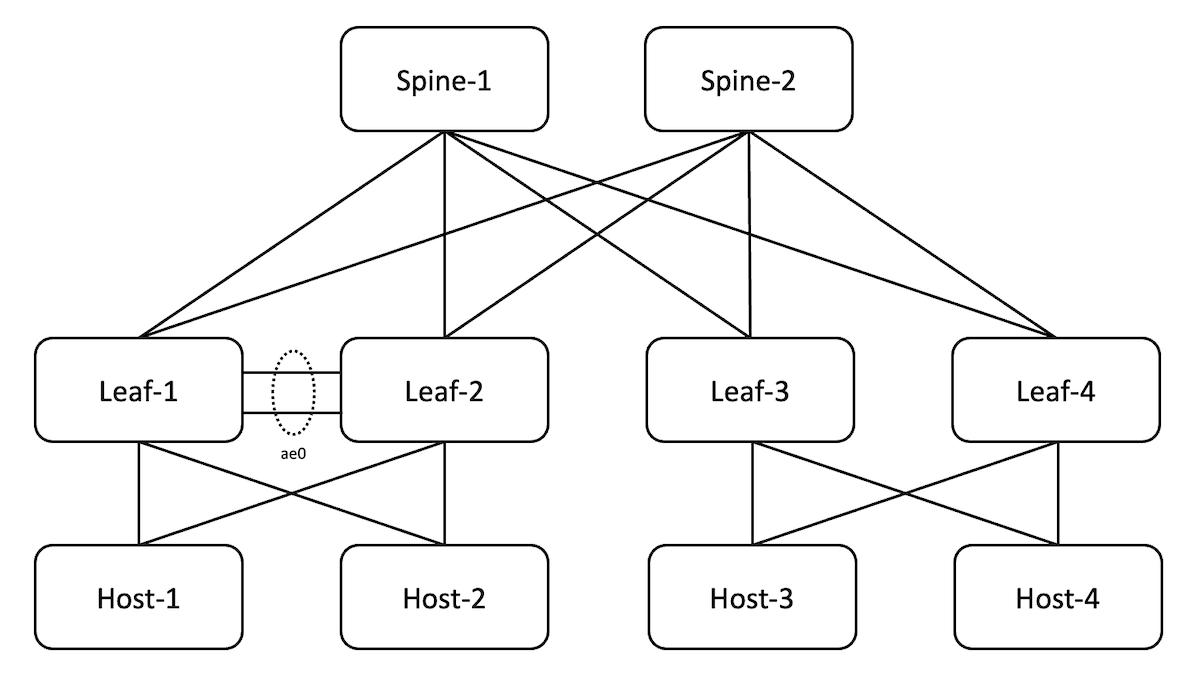
The fabric is preconfigured to provide basic underlay connectivity and all leafs and spines redistribute and receive all lookback addresses via the underlay protocol.
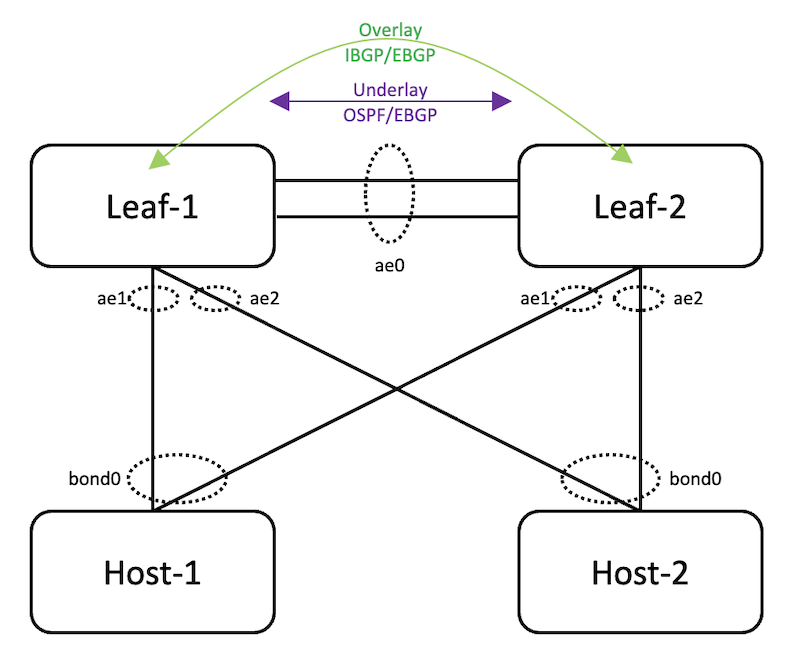
In this post, we will use EBGP as the underlay protocol, but we will explain later that OSPF can be equally used.
For the sake of comparing EZ-LAG to ESI-LAG and providing connectivity between all the hosts in the topology, the fabric is configured with BGP as an overlay protocol for family evpn, but only Leaf-3 and Leaf-4 are configured for EVPN-VXLAN. Therefore, Host-3 and Host-4 are dual homed to Leaf-3 and Leaf-4 with ESI-LAG and have overlay connectivity, but there is no connectivity between Host-1/Host-2 and Host-3/Host-4. The objective is to show how to achieve that connectivity by configuring EZ-LAG. Therefore, in the rest of this post, we will focus solely on the configuration of Leaf-1 and Leaf-2 for EZ-LAG.
In this post, we will use EBGP as the overlay protocol, but we will explain later that IBGP can be equally used.
Figure 2: Reference Topology for EZ-LAG Configuration
A new configuration hierarchy, called "evpn" under "services" stanza has been introduced specifically for EZ-LAG, where the user can specify a limited set of parameters to configure the feature.
A Python script that the user can call via a commit script. The commit script takes the set of parameters specified by the user and derives all the necessary configuration to build the EZ-LAG. All configuration generated by the commit script will not be visible to the user, unless they explicitly specify "display commit-script", that's how the complexity of configuration is hidden from users who want to use the benefits of EZ-LAG feature, without carrying the complexity of its configuration.
"defaults-override" : all configuration knobs under this section are optional ; in this section, the user can specify all parameters they want to preserve, so the commit script will not override them. For example, if the user prefers to use a pre-configured ASN and specify "no-policy-and-routing-options-config" then they will need to configure everything under ""routing-options" and "policy-options" hierarchies that are needed for EZ-LAG to function, like a Router-ID, a policy to export loopback addresses in the underlay, and a policy to load balance traffic exported to the forwarding table. Otherwise, an error will be thrown if you try to commit.
"global-parameters" : all configuration knobs under this section are optional ; in this section, the user specifies the parameters that are common to both peers
"device-attribute" : all configuration knobs under this section are mandatory, except "overlay-connectivity" ; this section contains parameters that are specific to the local peer. Parameters in this section must be carefully selected because must either match or be compatible with what is configured on the remote peer.
"evpn-vxlan" : this section contains a mix of mandatory and optional parameters ; in this section, the user specifies the parameters needed to configure EVPN-VXLAN for EZ-LAG to function. This section requires a minimum understanding of how this feature works.
Table 1 below provides more details about the new configuration stanzas, attributes, their purpose, and if they are mandatory or optional:
Object
Attribute
Description
Mandatory
default-override
All configuration parameters in this section are optional. In this section, the user specifies which configuration sections they want to configure manually and to prevent them from being over-written by auto-derived parameters.
No
no-platform-defaults-config
Do not auto-derive platform specific configurations.
No
no-aggregate-device-count-config
EZ-LAG needs at least two ae interfaces to function, ae0 for inter-chassis link, then one per dual-homed server.Device count must be configured otherwise the script will use the platform default, commonly 255
No
no-policy-and-routing-options-config
EZ-LAG script needs to configure autonomous-system and router-id under routing-options section, and per-packet load-balancing and export loopback under policy-options section. This knob id to allow the user to configure these manually.Note that if policies are configured manually, their names must be "pplb" and "EXPORT-LO0"
No
no-loop-detect-config
This knob can be used to configure "protocols loop-detect" section manually. The auto-derived configuration of this section will be shown later in this post
No
no-storm-control-config
This know lets the user configure storm-control manually under interfaces and forwarding-options sections. More details on this later in this post.
No
no-underlay-config
This is a hidden knob that instructs the script not to generate an underlay configuration section.At the time of writing this post, this knob is not implemented
No
global-parameters
This section contains parameters that are common across peers
start-aggregate-ethernet-index [ae-index]
By default, the script starts assigning dual-homed server interfaces starting from ae1. This knob allows to start the numbering from a different index to avoid potential conflicts
No
default-vlan-id [vlan-id]
Specify the default VLAN ID. The default is system-default, generally 0
No
anycast-mac [mac-address]
In case anycast is used for irb interfaces, this knob allows to configure the anycast MAC address.If virtual-gateway is used, this MAC address will be used as virtual-gateway-v4-mac
No
no-irb-address-auto-derive
Do not auto-derive address and use the subnet address as is
No
virtual-gateway
You can configure either virtual-gateway-mac or virtual-gateway and then either v4-mac or v6-mac or both parameters
No
v4-mac [mac-address]
The default is 00:00:5e:00:01:01
No
v6-mac [mac-address]
The default is 00:00:5e:00:02:01
No
virtual-gateway-mac
[mac-address]
This applies both to v4 and v6 gateways
device-attribute
This section contains parameters that are specific to local peer device
peer-id [peer-id]
Local peer ID. It's important to choose this parameter carefully for both peers, because many other parameters are auto-derived by using this peer-idOne of the peers must have peer-id=1 and the other must be different than 1
Yes
loopback-subnet [loopback-subnet]
lo0 prefix for deriving loopback address
Yes
system-id [system-id]
System identifier in MAC address format ; this parameter must be identical on both peers, and will be used to auto-generate one system-id per ae interface, by incrementing by esi-lag-id for each ae interface.
Yes
peer-to-peer
peer-subnet [inet]
IPv4 address to be used for ae0 interface. Must be /31 subnetNOTE: either ipv4 or ipv6 is mandatory
Yes
peer-subnet [inet6]
IPv6 address to be used for ae0 interface. Must be a /127 subnetNOTE: either ipv4 or ipv6 is mandatory
Yes
peer-subnet interface [interface-name]
Peer to peer interface or list of interfaces between "[]" brackets
Yes
overlay-connectivityibgp
Option to choose IBGP for the overlayNOTE: default is EBGP
No
underlay-connectivityospf
Option to choose OSPF for the underlayNOTE: default is EBGP
No
evpn-vxlan
Parameters for routing-instance and ESI-LAG configuration
Option to use anycast address instead of an irb gateway.If you configure this knob, you must also configure the anycast-mac address
No
interface-name
Name of irb interface ; there could be multiple irb interfaces.
Yes
subnet-address inet [ipv4-subnet-address]
Ipv4 address for irb gatewayNOTE: Either inet or inet6 is mandatory
See Note
subnet-address inet6 [ipv6-subnet-address]
Ipv6 address for irb gatewayNOTE: Either inet or inet6 is mandatory
See Note
subnet-address no-irb-address-auto-derive
Do not auto-derive address and use the subnet address as is
No
subnet-addressvirtual-gateway-v4-address
Virtual Gateway IPv4 address
No
subnet-addressvirtual-gateway-v6-address
Virtual Gateway IPv6 address
No
vlan-id [vlan-id]
IEEE 802.1q VLAN identifier for VLAN (1..4094)
Yes
no-dhcp-relay
Exclude this irb from dhcp-relay
No
apply-config-groups
Apply groups to the generated irb configuration
No
irb-instance instance
vrf-instance [instance-id]
VRF instance identifier (1..255)NOTE: default is 1
No
mac-vrf-instance [instance-id]
MAC-VRF instance identifier (1..255)NOTE: default is 1
No
apply-config-groups
Apply groups to the generated irb configuration
No
server
server-name
Server name ; each server must be assigned a server-name
Yes
esi-lag-id
Assign an identifier for each server (1..1024)NOTE: Either esi-lag-id or single-home-id is mandatory
See Note
single-home-id
Assign an identifier for a single home server (1..1024)NOTE: Either esi-lag-id or single-home-id is mandatory
See Note
enable-pxe-boot
Enable PXE boot on this server
No
vlan-id-list [vlan-id-list]
List of VLANs for PEER to SERVERNOTE: With this config all VLANs will be in mac-vrf-instance 1NOTE: Either vlan-id-list or mac-vrf-instance vlan-id-list is mandatory
See Note
interface [interface-name]
Interface or list of peer-to-server interfaces
Yes
mac-vrf-instance [instance-id] vlan-id-list
List of VLANs for PEER to SERVER for mac-vrf-instanceNOTE: Either vlan-id-list or mac-vrf-instance vlan-id-list is mandatory
See Note
apply-config-groups
Apply groups to the generated interface configuration
No
no-lacp
Do not configure LACP for this server
No
Table 1: Parameters in Services EVPN Configuration Hierarchy
Attribute
Description
Default ValueAuto-Derived Value
[ae-device-count]
number of AE devices in the system
255 or platform specific
[ae-peer-to-peer]
PEER to PEER aggregate interface name
ae0
[local-address]
PEER to PEER address for ae0 ; derived from[peer-subnet]parameter
Virtual gateway addressNOTE: this can be specified by the:set services evpn evpn-vxlan irb irb_10subnet-address inet [ipv4-subnet-address] virtual-gateway-v4-address [virtual-gateway-v4-address]set services evpn evpn-vxlan irb irb_10subnet-address inet6 [ipv6-subnet-address] virtual-gateway-v6-address [virtual-gateway-v6-address]
Rightmost digit of [subnet-address] set to 254For exampleIf [subnet-address] == 10.0.1.11/24:[virtual-gateway-address] = 10.0.1.254
[policy-statement]
Policy to load-balance "per-packet", aka per flowset policy-options policy-statement pplb then load-balance per-packetset routing-options forwarding-table export pplb
pplb
[neighbor-address]
lo0 address of neighbor PEER
[loopback-subnet]+-1 for the leftmost IPv4 address digitFor example, [loopback-subnet] ==192.0.2.10/32If [peer-id] == 1:[neighbor-address] =193.0.2.10else[neighbor-address] =191.0.2.10
[loopback-subnet]+-1 for the leftmost IPv4 address digitFor example, [loopback-subnet] ==192.0.2.10/32if [peer-id] == 1:[neighbor-address] =193.0.2.10else[neighbor-address] =191.0.2.10
set version 23.2R1.13
set system host-name qfx1
set system root-authentication encrypted-password "[secret data]"
set system services ssh root-login allow
set system syslog user * any emergency
set system syslog file interactive-commands interactive-commands any
set system syslog file messages any notice
set system syslog file messages authorization info
set interfaces em0 unit 0 family inet address 192.168.1.101/24
set forwarding-options evpn-vxlan shared-tunnels
set routing-options static route 0.0.0.0/0 next-hop 192.168.1.1
set protocols lldp port-id-subtype interface-name
set protocols lldp interface all
set version 23.2R1.13
set system host-name qfx2
set system root-authentication encrypted-password "[secret data]"
set system services ssh root-login allow
set system syslog user * any emergency
set system syslog file interactive-commands interactive-commands any
set system syslog file messages any notice
set system syslog file messages authorization info
set interfaces em0 unit 0 family inet address 192.168.1.102/24
set forwarding-options evpn-vxlan shared-tunnels
set routing-options static route 0.0.0.0/0 next-hop 192.168.1.1
set protocols lldp port-id-subtype interface-name
set protocols lldp interface all
set system scripts commit allow-transients
set system scripts commit file services_evpn_commit_script.py
set services evpn device-attribute peer-id 7
set services evpn device-attribute loopback-subnet 111.1.1.10/32
set services evpn device-attribute system-id 00:14:15:16:17:10
set services evpn device-attribute peer-to-peer peer-subnet inet 172.16.12.0/31
set services evpn device-attribute peer-to-peer peer-subnet interface-name xe-0/0/46
set services evpn evpn-vxlan irb IRB_100 vlan-id 100
set services evpn evpn-vxlan irb IRB_100 subnet-address inet 10.0.1.10/24
set services evpn evpn-vxlan irb IRB_200 vlan-id 200
set services evpn evpn-vxlan irb IRB_200 subnet-address inet 10.0.2.10/24
set services evpn evpn-vxlan server SERVER_1 esi-lag-id 1
set services evpn evpn-vxlan server SERVER_1 vlan-id-list 100
set services evpn evpn-vxlan server SERVER_1 vlan-id-list 200
set services evpn evpn-vxlan server SERVER_1 interface xe-0/0/45
set services evpn evpn-vxlan server SERVER_2 esi-lag-id 2
set services evpn evpn-vxlan server SERVER_2 vlan-id-list 100
set services evpn evpn-vxlan server SERVER_2 vlan-id-list 200
set services evpn evpn-vxlan server SERVER_2 interface xe-0/0/44
Let's now look at the details of the configuration that has been generated by the commit script and verify that the setup is working as expected.
As explained at the beginning of this post, since the whole objective of this feature is to not expose the complexity of EVPN-VXLAN configuration to the user, we chose to implement it by using a commit script. The curious user can refer to the document listed in the "Useful Links" section to learn more about how commit scripts work on a Junos device. For the purpose of this post, we can simply say that a commit script is a tool that allows the user to verify at commit time that the configuration complies with certain user defined rules, and generate warnings, logs, or even change the configuration itself. It is the latter option that is used to implement EZ-LAG feature. In this case, when the user commits the configuration above, the commit script parses "services evpn" section of the configuration and generates other configuration sections that are not exposed by default in the configuration displayed with "show configuration" command. However, the user can always use "display commit-scripts" to see the entire configuration, the original one and the commit-script generated one, all merged into one configuration, with certain markers for easier reading.
The excerpt below shows the output of this special "show" command on Leaf-1 after committing the configuration listed above.
We can see that the commit script auto generated CLI configuration commands under interfaces, forwarding-options, policy-options, routing-instances, routing-options, and protocols stanzas.
{master:0}
root@qfx1] show configuration | display commit-scripts | display set
set version 23.2R1.13
set system host-name qfx1
set system root-authentication encrypted-password "$6$8xY0iVur$w8.f59mL/q7w4VtO4KZCCSape0vDokgktMxfJ2Z.MY.1pBjvVR5wPlhYiG.3sg31UsxjHnnWjHezBJ6kAQYnd0"
set system scripts commit allow-transients
set system scripts commit file services_evpn_commit_script.py
set system services ssh root-login allow
set system syslog user * any emergency
set system syslog file interactive-commands interactive-commands any
set system syslog file messages any notice
set system syslog file messages authorization info
set chassis aggregated-devices ethernet device-count 255
set chassis network-services enhanced-ip
set services evpn device-attribute peer-id 1
set services evpn device-attribute loopback-subnet 111.1.1.10/32
set services evpn device-attribute system-id 00:01:02:03:04:05
set services evpn device-attribute peer-to-peer peer-subnet inet 172.16.12.0/31
set services evpn device-attribute peer-to-peer peer-subnet interface-name xe-0/0/46
set services evpn evpn-vxlan irb IRB_100 vlan-id 100
set services evpn evpn-vxlan irb IRB_100 subnet-address inet 10.0.1.11/24
set services evpn evpn-vxlan irb IRB_200 vlan-id 200
set services evpn evpn-vxlan irb IRB_200 subnet-address inet 10.0.2.11/24
set services evpn evpn-vxlan server SERVER_1 esi-lag-id 1
set services evpn evpn-vxlan server SERVER_1 vlan-id-list 100
set services evpn evpn-vxlan server SERVER_1 interface xe-0/0/45
set services evpn evpn-vxlan server SERVER_2 esi-lag-id 2
set services evpn evpn-vxlan server SERVER_2 vlan-id-list 200
set services evpn evpn-vxlan server SERVER_2 interface xe-0/0/44
set interfaces xe-0/0/44 ether-options ethernet-switch-profile storm-control __SERVICES_EVPN_EVPN_VXLAN_STORM_CONTROL
set interfaces xe-0/0/44 ether-options 802.3ad ae2
set interfaces xe-0/0/45 ether-options ethernet-switch-profile storm-control __SERVICES_EVPN_EVPN_VXLAN_STORM_CONTROL
set interfaces xe-0/0/45 ether-options 802.3ad ae1
set interfaces xe-0/0/46 ether-options 802.3ad ae0
set interfaces ae0 aggregated-ether-options lacp active
set interfaces ae0 unit 0 family inet address 172.16.12.0/31
set interfaces ae1 vlan-tagging
set interfaces ae1 encapsulation flexible-ethernet-services
set interfaces ae1 esi auto-derive type-1-lacp
set interfaces ae1 esi all-active
set interfaces ae1 aggregated-ether-options lacp active
set interfaces ae1 aggregated-ether-options lacp system-id 00:01:02:03:04:06
set interfaces ae1 unit 1 family ethernet-switching interface-mode trunk
set interfaces ae1 unit 1 family ethernet-switching vlan members 100
set interfaces ae2 vlan-tagging
set interfaces ae2 encapsulation flexible-ethernet-services
set interfaces ae2 esi auto-derive type-1-lacp
set interfaces ae2 esi all-active
set interfaces ae2 aggregated-ether-options lacp active
set interfaces ae2 aggregated-ether-options lacp system-id 00:01:02:03:04:07
set interfaces ae2 unit 1 family ethernet-switching interface-mode trunk
set interfaces ae2 unit 1 family ethernet-switching vlan members 200
set interfaces em0 unit 0 family inet address 10.87.11.81/25
set interfaces irb unit 100 virtual-gateway-accept-data
set interfaces irb unit 100 family inet address 10.0.1.11/24 virtual-gateway-address 10.0.1.254
set interfaces irb unit 100 virtual-gateway-v4-mac 00:00:5e:00:01:01
set interfaces irb unit 200 virtual-gateway-accept-data
set interfaces irb unit 200 family inet address 10.0.2.11/24 virtual-gateway-address 10.0.2.254
set interfaces irb unit 200 virtual-gateway-v4-mac 00:00:5e:00:01:01
set interfaces lo0 unit 0 family inet address 111.1.1.10/32 primary
set interfaces lo0 unit 0 family inet address 111.1.1.10/32 preferred
set forwarding-options storm-control-profiles __SERVICES_EVPN_EVPN_VXLAN_STORM_CONTROL all bandwidth-percentage 1
set forwarding-options evpn-vxlan shared-tunnels
set forwarding-options vxlan-routing next-hop 45056
set forwarding-options vxlan-routing interface-num 8192
set forwarding-options vxlan-routing overlay-ecmp
set policy-options policy-statement EXPORT-LO0 term LOOPBACK from interface lo0.0
set policy-options policy-statement EXPORT-LO0 term LOOPBACK then accept
set policy-options policy-statement EXPORT-LO0 term REJECT then reject
set policy-options policy-statement pplb then load-balance per-packet
set routing-instances __SERVICES_EVPN_EVPN_VXLAN_MAC_VRF_1 instance-type mac-vrf
set routing-instances __SERVICES_EVPN_EVPN_VXLAN_MAC_VRF_1 protocols evpn encapsulation vxlan
set routing-instances __SERVICES_EVPN_EVPN_VXLAN_MAC_VRF_1 protocols evpn default-gateway no-gateway-community
set routing-instances __SERVICES_EVPN_EVPN_VXLAN_MAC_VRF_1 vtep-source-interface lo0.0
set routing-instances __SERVICES_EVPN_EVPN_VXLAN_MAC_VRF_1 service-type vlan-aware
set routing-instances __SERVICES_EVPN_EVPN_VXLAN_MAC_VRF_1 interface ae1.1
set routing-instances __SERVICES_EVPN_EVPN_VXLAN_MAC_VRF_1 interface ae2.1
set routing-instances __SERVICES_EVPN_EVPN_VXLAN_MAC_VRF_1 route-distinguisher 111.1.1.10:1
set routing-instances __SERVICES_EVPN_EVPN_VXLAN_MAC_VRF_1 vrf-target target:1:1
set routing-instances __SERVICES_EVPN_EVPN_VXLAN_MAC_VRF_1 vlans SERVICES_EVPN_EVPN_VXLAN_VLAN_100 vlan-id 100
set routing-instances __SERVICES_EVPN_EVPN_VXLAN_MAC_VRF_1 vlans SERVICES_EVPN_EVPN_VXLAN_VLAN_100 l3-interface irb.100
set routing-instances __SERVICES_EVPN_EVPN_VXLAN_MAC_VRF_1 vlans SERVICES_EVPN_EVPN_VXLAN_VLAN_100 vxlan vni 10100
set routing-instances __SERVICES_EVPN_EVPN_VXLAN_MAC_VRF_1 vlans SERVICES_EVPN_EVPN_VXLAN_VLAN_200 vlan-id 200
set routing-instances __SERVICES_EVPN_EVPN_VXLAN_MAC_VRF_1 vlans SERVICES_EVPN_EVPN_VXLAN_VLAN_200 l3-interface irb.200
set routing-instances __SERVICES_EVPN_EVPN_VXLAN_MAC_VRF_1 vlans SERVICES_EVPN_EVPN_VXLAN_VLAN_200 vxlan vni 10200
set routing-options router-id 111.1.1.10
set routing-options autonomous-system 65001
set routing-options static route 0.0.0.0/0 next-hop 10.87.11.126
set routing-options forwarding-table export pplb
set protocols bgp group __SERVICES_EVPN_EVPN_VXLAN_EBGP_UNDERLAY type external
set protocols bgp group __SERVICES_EVPN_EVPN_VXLAN_EBGP_UNDERLAY local-address 172.16.12.0
set protocols bgp group __SERVICES_EVPN_EVPN_VXLAN_EBGP_UNDERLAY export EXPORT-LO0
set protocols bgp group __SERVICES_EVPN_EVPN_VXLAN_EBGP_UNDERLAY local-as 65004
set protocols bgp group __SERVICES_EVPN_EVPN_VXLAN_EBGP_UNDERLAY multipath multiple-as
set protocols bgp group __SERVICES_EVPN_EVPN_VXLAN_EBGP_UNDERLAY neighbor 172.16.12.1 peer-as 65003
set protocols bgp group __SERVICES_EVPN_EVPN_VXLAN_EBGP_OVERERLAY type external
set protocols bgp group __SERVICES_EVPN_EVPN_VXLAN_EBGP_OVERERLAY multihop ttl 2
set protocols bgp group __SERVICES_EVPN_EVPN_VXLAN_EBGP_OVERERLAY multihop no-nexthop-change
set protocols bgp group __SERVICES_EVPN_EVPN_VXLAN_EBGP_OVERERLAY local-address 111.1.1.10
set protocols bgp group __SERVICES_EVPN_EVPN_VXLAN_EBGP_OVERERLAY family evpn signaling
set protocols bgp group __SERVICES_EVPN_EVPN_VXLAN_EBGP_OVERERLAY neighbor 112.1.1.10 peer-as 65002
set protocols evpn no-core-isolation
set protocols lldp port-id-subtype interface-name
set protocols lldp interface all
set protocols loop-detect enhanced interface ae1 vlan-id 100
set protocols loop-detect enhanced interface ae1 loop-detect-action interface-down
set protocols loop-detect enhanced interface ae1 transmit-interval 1s
set protocols loop-detect enhanced interface ae1 revert-interval 60
set protocols loop-detect enhanced interface ae2 vlan-id 200
set protocols loop-detect enhanced interface ae2 loop-detect-action interface-down
set protocols loop-detect enhanced interface ae2 transmit-interval 1s
set protocols loop-detect enhanced interface ae2 revert-interval 60
You see the benefits of EZ-LAG feature by comparing the length of the original config to that of the auto-generated one and understand the time saving to configure it and having less chances to make configuration mistakes at the same time.
Notice the highlighted system-ids for both ae interfaces that are autogenerated and must match on the two peers.
Let's now verify that the setup is working as expected by running some operational CLI commands.
{master:0}
root@qfx1] show interfaces terse
Interface               Admin Link Proto    Local                 Remote

[snip]

xe-0/0/44               up    up
xe-0/0/44.1             up    up   aenet    --] ae2.1
xe-0/0/44.32767         up    up   aenet    --] ae2.32767
xe-0/0/45               up    up
xe-0/0/45.1             up    up   aenet    --] ae1.1
xe-0/0/45.32767         up    up   aenet    --] ae1.32767
xe-0/0/46               up    up
xe-0/0/46.0             up    up   aenet    --] ae0.0

[snip]

ae0                     up    up
ae0.0                   up    up   inet     172.16.12.0/31
ae1                     up    up
ae1.1                   up    up   eth-switch
ae1.32767               up    up
ae2                     up    up
ae2.1                   up    up   eth-switch
ae2.32767               up    up

[snip]

irb                     up    up
irb.100                 up    up   inet     10.0.1.11/24
                                            10.0.1.254/24
irb.200                 up    up   inet     10.0.2.11/24
                                            10.0.2.254/24

[snip]

lo0.0                   up    up   inet     111.1.1.10          --] 0/0
lo0.16384               up    up   inet     127.0.0.1           --] 0/0
lo0.16385               up    up   inet

[snip]
{master:0}
root@qfx2] show interfaces terse
Interface               Admin Link Proto    Local                 Remote
gr-0/0/0                up    up
pfe-0/0/0               up    up
pfe-0/0/0.16383         up    up   inet
                                   inet6
pfh-0/0/0               up    up
pfh-0/0/0.16383         up    up   inet
pfh-0/0/0.16384         up    up   inet
xe-0/0/44               up    up
xe-0/0/44.1             up    up   aenet    --] ae2.1
xe-0/0/44.32767         up    up   aenet    --] ae2.32767
xe-0/0/45               up    up
xe-0/0/45.1             up    up   aenet    --] ae1.1
xe-0/0/45.32767         up    up   aenet    --] ae1.32767
xe-0/0/46               up    up
xe-0/0/46.0             up    up   aenet    --] ae0.0
et-0/0/48               up    up
et-0/0/48.16386         up    up
et-0/0/50               up    up
et-0/0/50.16386         up    up
ae0                     up    up
ae0.0                   up    up   inet     172.16.12.1/31
ae1                     up    up
ae1.1                   up    up   eth-switch
ae1.32767               up    up
ae2                     up    up
ae2.1                   up    up   eth-switch
ae2.32767               up    up
bme0                    up    up
bme0.0                  up    up   inet     128.0.0.1/2
                                            128.0.0.4/2
                                            128.0.0.63/2
cbp0                    up    up
dsc                     up    up
em0                     up    up
em0.0                   up    up   inet     10.87.11.82/25
em1                     up    down
em2                     up    up
em2.32768               up    up   inet     192.168.1.2/24
em3                     up    up
esi                     up    up
fti0                    up    up
gre                     up    up
ipip                    up    up
irb                     up    up
irb.100                 up    up   inet     10.0.1.11/24
                                            10.0.1.254/24
irb.200                 up    up   inet     10.0.2.11/24
                                            10.0.2.254/24
jsrv                    up    up
jsrv.1                  up    up   inet     128.0.0.127/2
lo0                     up    up
lo0.0                   up    up   inet     112.1.1.10          --] 0/0
lo0.16384               up    up   inet     127.0.0.1           --] 0/0
lo0.16385               up    up   inet
lsi                     up    up
mtun                    up    up
pimd                    up    up
pime                    up    up
pip0                    up    up
tap                     up    up
vme                     up    down
vtep                    up    up
vtep.32768              up    up
vtep.32769              up    up   eth-switch
vtep.32771              up    up

{master:0}
root@qfx2]
The above excerpt shows that the script created interfaces ae0.0, ae1.1, ae2.1, irb.100, irb.200, and lo0.0 and assigned the proper addresses.
It's also important to verify that ae1 and ae2 interfaces are "up up" on both leafs, because ESI is configured in all-active mode.
Let's first look at LACP status and statistics. It is important that Host-1 sees Leaf-1 and Leaf-2 as the same LACP system, therefore it does not know that it is dual-homed to two separate leafs. This is verified below because the System ID is identical for the "Actor" role on both leafs.
{master:0}
root@qfx1] show lacp interfaces ae1 extensive
Aggregated interface: ae1
    LACP state:       Role   Exp   Def  Dist  Col  Syn  Aggr  Timeout  Activity
      xe-0/0/45      Actor    No    No   Yes  Yes  Yes   Yes     Fast    Active
      xe-0/0/45    Partner    No    No   Yes  Yes  Yes   Yes     Fast    Active
    LACP protocol:        Receive State  Transmit State          Mux State
      xe-0/0/45                 Current   Fast periodic Collecting distributing
    LACP info:        Role     System             System       Port     Port    Port
                             priority         identifier   priority   number     key
      xe-0/0/45      Actor        127  00:01:02:03:04:06        127        2       2
      xe-0/0/45    Partner      65535  90:e2:ba:d9:30:64        255        1      15

{master:0}
root@qfx1]
{master:0}
root@qfx2] show lacp interfaces ae1 extensive
Aggregated interface: ae1
    LACP state:       Role   Exp   Def  Dist  Col  Syn  Aggr  Timeout  Activity
      xe-0/0/45      Actor    No    No   Yes  Yes  Yes   Yes     Fast    Active
      xe-0/0/45    Partner    No    No   Yes  Yes  Yes   Yes     Fast    Active
    LACP protocol:        Receive State  Transmit State          Mux State
      xe-0/0/45                 Current   Fast periodic Collecting distributing
    LACP info:        Role     System             System       Port     Port    Port
                             priority         identifier   priority   number     key
      xe-0/0/45      Actor        127  00:01:02:03:04:06        127        2       2
      xe-0/0/45    Partner      65535  90:e2:ba:d9:30:64        255        2      15

{master:0}
root@qfx2]
Let's now have a closer look at one of the AE interfaces.
EZ-LAG sets LACP auto-derive mode to "type-1-lacp" and, in this mode, the ESI is the system ID and the administrative key on the remote CE device in the LACP link (partner). In our case, the remote CE device is Host-1
01 - ESI Type-1
90:e2:ba:d9:30:64 - MAC address of the bond on Host-1
00:0f - admin key on Host-1
00 - the last octet is always 0
These information can be easily verified on Host-1
{master:0}
root@qfx2] show interfaces ae1 extensive | match multi-homed
    Protocol eth-switch, MTU: 1518, Generation: 301, Route table: 8, Mesh Group: __all_ces__, EVPN multi-homed status: Blocking BUM Traffic to ESI, EVPN multi-homed ESI Split Horizon Label: 0,

{master:0}
root@qfx2]
In our case, we can see that EVPN multi-homed status on Leaf-1 is "Forwarding" and that on Leaf-2, the status is "Blocking BUM traffic to ESI".
From BGP perspective, we need to have two BGP sessions, one for the underlay and another for the overlay. Here both are "Established" and Leaf-1 received 12 EVPN routes.
Now, it's important to check EVPN routes that have been exchanged between the two peers, after verifying reachability between Host-1 and Host-2.
In the context of this post, we're more particularly interested in Type 1 EVPN routes that are used for per Ethernet segment auto-discovery to advertise EVPN multi-homing mode.
{master:0}
root@qfx1] show route table bgp.evpn.0 protocol bgp

bgp.evpn.0: 44 destinations, 44 routes (44 active, 0 holddown, 0 hidden)
+ = Active Route, - = Last Active, * = Both

1:112.1.1.10:0::0190e2bad1e230000f00::FFFF:FFFF/192 AD/ESI
                   *[BGP/170] 02:25:52, localpref 100, from 112.1.1.10
                      AS path: 65002 I, validation-state: unverified
                    ]  to 172.16.12.1 via ae0.0
1:112.1.1.10:0::0190e2bad93064000f00::FFFF:FFFF/192 AD/ESI
                   *[BGP/170] 02:25:53, localpref 100, from 112.1.1.10
                      AS path: 65002 I, validation-state: unverified
                    ]  to 172.16.12.1 via ae0.0
1:112.1.1.10:0::050000fdea0000277400::FFFF:FFFF/192 AD/ESI
                   *[BGP/170] 04:09:41, localpref 100, from 112.1.1.10
                      AS path: 65002 I, validation-state: unverified
                    ]  to 172.16.12.1 via ae0.0
1:112.1.1.10:0::050000fdea000027d800::FFFF:FFFF/192 AD/ESI
                   *[BGP/170] 04:09:41, localpref 100, from 112.1.1.10
                      AS path: 65002 I, validation-state: unverified
                    ]  to 172.16.12.1 via ae0.0
1:112.1.1.10:1::0190e2bad1e230000f00::0/192 AD/EVI
                   *[BGP/170] 02:25:53, localpref 100, from 112.1.1.10
                      AS path: 65002 I, validation-state: unverified
                    ]  to 172.16.12.1 via ae0.0
1:112.1.1.10:1::0190e2bad93064000f00::0/192 AD/EVI
                   *[BGP/170] 02:25:54, localpref 100, from 112.1.1.10
                      AS path: 65002 I, validation-state: unverified
                    ]  to 172.16.12.1 via ae0.0
2:112.1.1.10:1::10100::00:00:5e:00:01:01/304 MAC/IP
                   *[BGP/170] 04:09:41, localpref 100, from 112.1.1.10
                      AS path: 65002 I, validation-state: unverified
                    ]  to 172.16.12.1 via ae0.0, Push 631
2:112.1.1.10:1::10100::80:7f:f8:d2:02:60/304 MAC/IP
                   *[BGP/170] 04:09:41, localpref 100, from 112.1.1.10
                      AS path: 65002 I, validation-state: unverified
                    ]  to 172.16.12.1 via ae0.0, Push 631
2:112.1.1.10:1::10100::90:e2:ba:d9:30:64/304 MAC/IP
                   *[BGP/170] 01:34:16, localpref 100, from 112.1.1.10
                      AS path: 65002 I, validation-state: unverified
                    ]  to 172.16.12.1 via ae0.0, Push 631
2:112.1.1.10:1::10200::00:00:5e:00:01:01/304 MAC/IP
                   *[BGP/170] 04:09:41, localpref 100, from 112.1.1.10
                      AS path: 65002 I, validation-state: unverified
                    ]  to 172.16.12.1 via ae0.0, Push 637
2:112.1.1.10:1::10200::80:7f:f8:d2:02:60/304 MAC/IP
                   *[BGP/170] 04:09:41, localpref 100, from 112.1.1.10
                      AS path: 65002 I, validation-state: unverified
                    ]  to 172.16.12.1 via ae0.0, Push 637
2:112.1.1.10:1::10200::90:e2:ba:d1:e2:30/304 MAC/IP
                   *[BGP/170] 01:34:16, localpref 100, from 112.1.1.10
                      AS path: 65002 I, validation-state: unverified
                    ]  to 172.16.12.1 via ae0.0, Push 637
2:112.1.1.10:1::10100::00:00:5e:00:01:01::10.0.1.254/304 MAC/IP
                   *[BGP/170] 04:09:41, localpref 100, from 112.1.1.10
                      AS path: 65002 I, validation-state: unverified
                    ]  to 172.16.12.1 via ae0.0, Push 631
2:112.1.1.10:1::10100::80:7f:f8:d2:02:60::10.0.1.11/304 MAC/IP
                   *[BGP/170] 04:09:41, localpref 100, from 112.1.1.10
                      AS path: 65002 I, validation-state: unverified
                    ]  to 172.16.12.1 via ae0.0, Push 631
2:112.1.1.10:1::10100::90:e2:ba:d9:30:64::10.0.1.111/304 MAC/IP
                   *[BGP/170] 00:19:07, localpref 100, from 112.1.1.10
                      AS path: 65002 I, validation-state: unverified
                    ]  to 172.16.12.1 via ae0.0, Push 631
2:112.1.1.10:1::10200::00:00:5e:00:01:01::10.0.2.254/304 MAC/IP
                   *[BGP/170] 04:09:41, localpref 100, from 112.1.1.10
                      AS path: 65002 I, validation-state: unverified
                    ]  to 172.16.12.1 via ae0.0, Push 637
2:112.1.1.10:1::10200::80:7f:f8:d2:02:60::10.0.2.11/304 MAC/IP
                   *[BGP/170] 04:09:41, localpref 100, from 112.1.1.10
                      AS path: 65002 I, validation-state: unverified
                    ]  to 172.16.12.1 via ae0.0, Push 637
2:112.1.1.10:1::10200::90:e2:ba:d1:e2:30::10.0.2.112/304 MAC/IP
                   *[BGP/170] 00:19:07, localpref 100, from 112.1.1.10
                      AS path: 65002 I, validation-state: unverified
                    ]  to 172.16.12.1 via ae0.0, Push 637
3:112.1.1.10:1::10100::112.1.1.10/248 IM
                   *[BGP/170] 04:09:42, localpref 100, from 112.1.1.10
                      AS path: 65002 I, validation-state: unverified
                    ]  to 172.16.12.1 via ae0.0
3:112.1.1.10:1::10200::112.1.1.10/248 IM
                   *[BGP/170] 04:09:42, localpref 100, from 112.1.1.10
                      AS path: 65002 I, validation-state: unverified
                    ]  to 172.16.12.1 via ae0.0
4:112.1.1.10:0::0190e2bad1e230000f00:112.1.1.10/296 ES
                   *[BGP/170] 02:25:53, localpref 100, from 112.1.1.10
                      AS path: 65002 I, validation-state: unverified
                    ]  to 172.16.12.1 via ae0.0
4:112.1.1.10:0::0190e2bad93064000f00:112.1.1.10/296 ES
                   *[BGP/170] 02:25:54, localpref 100, from 112.1.1.10
                      AS path: 65002 I, validation-state: unverified
                    ]  to 172.16.12.1 via ae0.0

{master:0}
root@qfx1]
In the CLI output above, we notice that there are two Type-1 EVPN routes per host, these are AD/ESI and AD/EVI routes. the AD/ESI route advertises the Ethernet segment to which the host is connected and the AD/EVI route advertises the remote EVPN to which the route belongs.
By looking at the ESIs in these routes and recalling what we explained above about how are these Type-1 ESI are constructed, we can identify that the 1st and 5th Type-1 routes are relative to Host-2, and that the 2nd and 6th Type-1 routes are relative to Host-1.
Now, how about the 3rd and 4th routes? Let's dissect the ESI of these routes and figure it out.
ESI "050000fdea0000277400" can be deconstructed as follows:
0x05 : Autonomous System Number (ASN) based ESI
0x0000fdea : ASN = 65002 (decimal)
0x00002774 : Local Discriminator = 10100 (decimal). In this case, the VNI is used as a Local Discriminator
0x00 : the last octet is always zero
This Type-1 route is in fact relative to the Virtual Gateway that was auto-derived from the EZ-LAG configuration. by default, EZ-LAG configures IRB interfaces with a virtual gateway, but there are CLI knobs available to change that into anycast mode. Those commands are:
In this post, we explained EZ-LAG feature in details. This new feature was introduced by Juniper as an alternative to MC-LAG and based on EVPN-VXLAN technology. We showed that the configuration of this feature has been made much simpler than ESI-LAG, which requires a full-fledged EVPN-VXLAN configuration. EZ-LAG hides the complexity of an ESI-LAG configuration while still providing the same feature and the same service. The knobs supported by EZ-LAG CLI allow the user to tailor the configuration and avoid conflicts with existing one for other features on the same switch.