The procedure for building a multi-geography multi-cluster from three Red Hat OpenShift Container Platform (RHOCP) clusters. The constructed multi-cluster will be capable of supporting Broadband Edge (BBE) cloud-native applications such as BNG CUPS Controller and Address Pool Manager (APM) in a geo-redundant capacity.
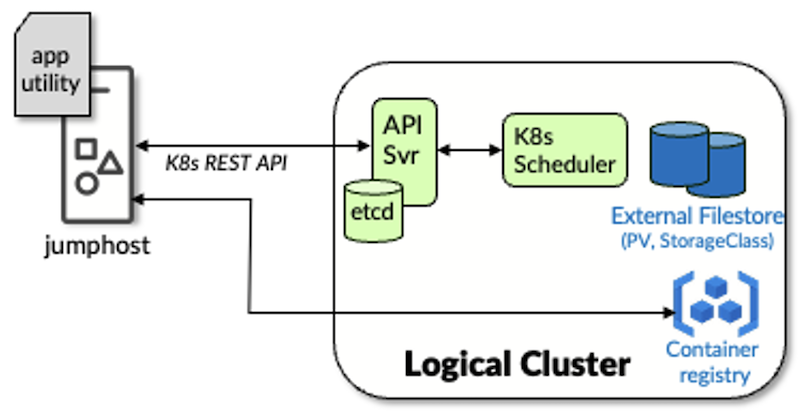
A typical Kubernetes cluster is comprised of at least 3 control-plane sites/nodes and 3 worker sites/nodes. For cost and simplicity, worker and control-plane functions may be combined into a hybrid node at the expense of redundancy. The cluster is accessed from a remote host through the Kubernetes API and the container registry (for pushing images). The remote host is often referred to as a jump or bastion host (see Figure 1).
Figure 1: Logical Representation of a Kubernetes Cluster
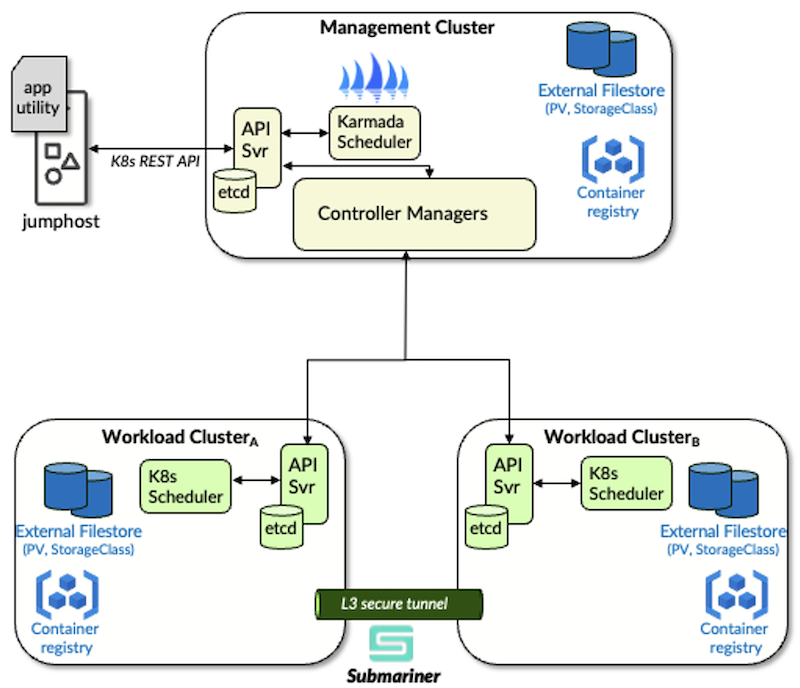
Multi-geography redundancy for Juniper Cloud-native Network Functions (CNFs) such as APM and BNG CUPS Controller, requires a topology of three Kubernetes clusters. Each cluster has at least three control-plane sites and three worker sites (or simply 3 combined control-plane/worker or hybrid nodes) to support basic redundancy and availability requirements. Each cluster is in its own geography or availability zone.
One cluster is designated as the Management Cluster and has reachability to the other two clusters which are designated as Workload Clusters. All three clusters are joined into a multi-cluster with the addition and setup of Karmada and Submariner Open Source Software (OSS) packages. A separate jumphost or bastion host with access to all three clusters will be used as the installation platform (see Figure 2).
Figure 2: A Multi-Geo Multi-Cluster
The procedure outlined in this document describes the steps needed to install and deploy the OSS such that a multi-geo multi-cluster is realized. Instructions for performing air-gapped and non-air-gapped installation are provided. Procedures for air-gapped are denoted in light-blue text.
A bastion host or jump host serves as a secure location for installing, configuring, and operating the OSS on the K8s clusters that will form the multi-cluster. The jumphost has administrative access to the K8s REST APIs of all three clusters.
Hardware dimensions
CPU: 2 cores
Memory: 8 GiB
Storage: 128 GiB
Software dimensions
OS: Ubuntu 22.04 LTS
User account with sudo privileges
Network access
For non-air-gapped installation, Internet access will be needed to download OSS components. Specifically, to the following sites:
The Management Cluster hosts the Karmada OSS in a separate Kubernetes context. The regular context can host CNF application components. The Management Cluster is a redundant cluster (minimum of three hybrid nodes). The Dimensions of each node are as follows.
Hardware Dimensions
CPU: 8 cores
Memory: 24 GiB
Storage: 256 GiB
Software Dimensions
OS: RHOCP 4.16 or later with
CNI: OVN
Registry: Openshift Image Registry
NLB: MetalLB
Pod & Service CIDRs: default
Network Access
Internet access will be needed to download OSS components. Specifically, to the following sites:
docker.io
registry.k8s.io
quay.io
The Management Cluster must be able to access the K8s REST API of each Workload Cluster.
The Workload Clusters host the bulk of the Multi-geo enabled CNF Application micro-services. Each Workload Cluster is a redundant cluster (minimum of three hybrid nodes). The Dimensions of each node are as follows:
Hardware Dimensions
CPU: 16 cores (if only APM application deployment, this can be scaled down to 8 cores)
Memory: 64GiB
Storage: 512 GiB
Software Dimensions
OS: RHOCP 4.16 or later with
CNI: OVN
Registry: Openshift Image Registry
NLB: MetalLB
CSI: Longhorn
Pod & Service CIDRs: Each Workload cluster must have different (non-overlapping) POD and Service CIDRs (since Submariner will join the two Workload Cluster internal networks, each internal network address space must not overlap with the other)
Network Access
Internet access will be needed to download OSS components. Specifically, to the following sites:
quay.io
Each Workload Cluster must be able to reach its peer Workload Cluster. Latency between Workload Clusters must be below 200ms.
Set up the kubeconfig on the jumphost such that it contains an admin context for each of the three clusters. As these context names may also be incorporated into pod names to distinguish them in the multi-cluster, it is critical to ensure that context names are simple and restricted to lowercase characters and hyphens ('-'). OpenShift generates contexts upon 'oc login' that incorporates the login name, namespace, port numbers, and host name delimited by '/' and ':' characters; do NOT use these contexts when constructing the multi-cluster. In this procedure, we will create contexts named mgmt, workload-a, and workload-b to represent the three clusters. The following best-practice procedure is recommended:
Generate a new admin kubeconfig for each of the clusters using the oc config new-admin-kubeconfig command. Store each generated kubeconfig in $HOME/.kube as mgmt.yaml, workload-a.yaml, and workload-b.yaml, with 0o600 permissions respectively.
In each of the kubeconfigs, rename the cluster and context to match the corresponding filenames (sans extension/type) and the user to the same name with a suffix of "-admin" (e.g. mgmt.-admin). Dumping each context using the associated kubconfig should appear as:
Re-tag the following images for the Management Cluster, taking note that the repository for each image must be adjusted to match the associated namespace name:
Re-tag the following images for each of the workload clusters, taking note that the repository for each image must be adjusted to match the associated namespace name:
Submariner is a CNCF Sandbox Project. Submariner enables the interconnection of the internal networks of two K8s clusters through an L3 tunnel. The interconnection enables cluster-internal communication between the application workloads on each cluster.
The Submariner Broker will be installed on the Management Cluster while a Submariner instance will be installed on each of the Workload Clusters. For the Submariner instances to reach the Broker's API, they must be able to resolve the Kubernetes API (e.g. api..) on the Management Cluster. This DNS name needs to be resolved through a proper DNS lookup. Add the following A-records to the DNS server whose IP address was specified during ISO creation:
api.<mgmtClusterName>.<domain>       A    <ClusterMgmtIP>
*.apps.<mgmtClusterName>.<domain>    A    <ClusterMgmtIP>
From the shell of one of the Workload Cluster nodes (for RHOCP Workload clusters access the shell via 'oc debug') perform an nslookup against the DNS name to ensure it resolves.
If both WL Clusters are joined successfully, we can verify the Submariner deployment by running a set of unit tests via subctl. These tests take about 5 minutes to run. Disable disruptive verifications when prompted. The following command tests the connectivity from the workload-a Cluster's K8s context to workload-b Cluster's context (see kubectl config get-contexts'):
$ # Warnings displayed about "system:authenticated" not being found are expected and can be ignored
$ oc --context workload-a -n submariner-operator policy add-role-to-group system:image-puller system:authenticated
$ oc --context workload-b -n submariner-operator policy add-role-to-group system:image-puller system:authenticated
$ subctl verify --context <workload1Context> --tocontext <workload2Context>
? You have specified disruptive verifications (gateway-failover). Are you sure you want to run them? (y/N) N
Currently, there is a known issue with Submariner tests with RHOCP 4.18 (see Connectivity test fails with OCP 4.18). We expect the following test failures:
Summarizing 2 Failures:

    [FAIL] Basic TCP connectivity tests across clusters without discovery when a pod connects via TCP to a remote pod when the pod is on a gateway and the remote pod is on a gateway [It] should have sent the expected data from the pod to the other pod [dataplane, basic]
    github.com/submariner-io/shipyard@v0.20.0/test/e2e/tcp/connectivity.go:72
    [FAIL] Basic TCP connectivity tests across clusters without discovery when a pod connects via TCP to a remote service when the pod is on a gateway and the remote service is on a gateway [It] should have sent the expected data from the pod to the other pod [dataplane, basic]
    github.com/submariner-io/shipyard@v0.20.0/test/e2e/tcp/connectivity.go:72

Ran 17 of 48 Specs in 318.692 seconds
FAIL! -- 15 Passed | 2 Failed | 0 Pending | 31 Skipped
Karmada is a CNCF (Cloud Native Computing Foundation) Incubating Project. Karmada enables workload scheduling across multiple K8s clusters and/or clouds.
The Karmada operator will be used to install Karmada on the Management Cluster. Note that in the yaml definitions below there are certain lines marked as being needed for air-gapped installs, which can be omitted otherwise.
Create the 'karmada-system' namespace/project on the Management Cluster
Bind the privileged Security Context Constraint (SCC) to the karmada-operator and default ServiceAccounts (does NOT require the karmada-operator ServiceAccount to exist) in the karmada-system namespace on the management context:
global: # For air-gapped

  imageRegistry: "image-registry.openshift-image-registry.svc:5000"
installCRDs: false
operator:
  image:
    repository: karmada-system/karmada-operator # For air-gapped
    tag: v1.13.1     # Version of container image to pull
  podAnnotations:
    openshift.io/required-scc: privileged # Operator needs to store CRs to container FS
Helm-install the operator with the above values file.
$ oc explain karmada.spec.components
GROUP:      operator.karmada.io
KIND:       Karmada
VERSION:    v1alpha1

FIELD: components <Object>

DESCRIPTION:
    Components define all of karmada components.
    not all of these components need to be installed.
.
.
Air-gapped:
For air-gapped installs, the CRDs tarball must be hosted in an offline webserver accessible by the operator.
$ oc --context mgmt -n karmada-system get pods
NAME                            READY   STATUS    RESTARTS       AGE
karmada-crds-667fc8979f-s6jcd   1/1     Running   0              10d
Create a custom resource YAML, karmada-instance.yaml, file (replacing the certSAN elements for the karmadaAPIServer and the default storage class) as follows:
apiVersion: operator.karmada.io/v1alpha1
kind: Karmada
metadata:
  name: karmada
  namespace: karmada-system
spec:
  crdTarball: # Air-gapped
    httpSource: # Air-gapped
      url: http://karmada-crds/1.13.1-crds.tar.gz # Air-gapped
  components:
    karmadaDescheduler:
      imageRepository: image-registry.openshift-image-registry.svc:5000/karmada-system/karmada-descheduler
      imageTag: v1.13.1
    karmadaAggregatedAPIServer:
      imageRepository: image-registry.openshift-image-registry.svc:5000/karmada-system/karmada-aggregated-apiserver # Air-gapped
      imageTag: v1.13.1
      annotations:
        openshift.io/required-scc: privileged
      featureGates:
        Failover: true
    karmadaControllerManager:
      imageRepository: image-registry.openshift-image-registry.svc:5000/karmada-system/karmada-controller-manager # Air-gapped
      imageTag: v1.13.1
      featureGates:
        Failover: true
    karmadaScheduler:
      imageRepository: image-registry.openshift-image-registry.svc:5000/karmada-system/karmada-scheduler # Air-gapped
      imageTag: v1.13.1
      featureGates:
        Failover: true
    karmadaWebhook:
      imageRepository: image-registry.openshift-image-registry.svc:5000/karmada-system/karmada-webhook # Air-gapped
      imageTag: v1.13.1
    karmadaMetricsAdapter:
      imageRepository: image-registry.openshift-image-registry.svc:5000/karmada-system/karmada-metrics-adapter # Air-gapped
      imageTag: v1.13.1
      annotations:
        openshift.io/required-scc: privileged
    kubeControllerManager:
      imageRepository: image-registry.openshift-image-registry.svc:5000/karmada-system/kube-controller-manager # Air-gapped
      imageTag: v1.31.3
    karmadaAPIServer:
      imageRepository: image-registry.openshift-image-registry.svc:5000/karmada-system/kube-apiserver # Air-gapped
      imageTag: v1.31.3
      serviceType: NodePort # Expose the API server to the WL clusters with external IP
      certSANs: # Add SANs so that the WL Clusters can accept the Mgmt Cluster's certificate
        - <MgmtClusterVIP>  # Mgmt Cluster Mgmt VIP/apiserver
      annotations:
        openshift.io/required-scc: privileged
    #
    # Default storage for etcd will be to use hostPath which
    # OpenShift will not tolerate so we add a 5Gi PVC
    # against the default storageClass (longhorn)
    #
    etcd:
      local:
        imageRepository: image-registry.openshift-image-registry.svc:5000/karmada-system/etcd # Air-gapped
        imageTag: 3.5.16-0
        replicas: 3
        volumeData:
          volumeClaim:
            spec:
              accessModes:
                - ReadWriteOnce
              resources:
                requests:
                  storage: 5Gi
              storageClassName: <defaultStorageClass>
Note: that for most of the Karmada components, we add an annotation that allows them to run in privileged mode. Without these annotations, Openshift will apply the most restrictive SCC (most interactions with the OS or the container filesystem will be curtailed).
The WL Clusters, as part of the join process, will need to access the Karmada API server. Verify that the API Server has a NodePort address and is reachable:
Edit the cluster and context names in the karmada kubeconfig to 'karmada-apiserver' and change the cluster address to match the Management Cluster's HA (VIP) address.
Add the new kubeconfig to the default kubeconfig (see step 3 in Kubeconfigs for an example of how to flatten the kubeconfigs)
The Management Cluster will need to be able to reach each of the WL Clusters through a DNS lookup. Ensure that the DNS Server serving the Management Cluster has entries for the WL Cluster API servers. E.g.
Keep track of the kube config file for the Management Cluster that you generated in step 2 of Preparing the Karmada Context. You will need to use this to generate a secret for the application's Observer micro-service to monitor Karmada scheduling events. See application installation guide for details on creating the kube config secret.
Application setup (APM of BNG CUPS Controller) has a lot more values to collect from the operator. At a minimum, registry push/pull addresses and the Karmada kubeconfig secrets can be put in a template file to be passed to the utility script's setup step (--template).
In the example below, the Management Cluster's Push FQDN is default-route-openshift-image-registry.apps.wf-mg-rh-kd-mdr.englab.juniper.net, Workload-a's Push FQDN is default-route-openshift-image-registry.apps.wf-mg-rh-wla-mdr.englab.juniper.net and Workload-b's FQDN is default-route-openshift-image-registry.apps.wf-mg-rh-wlb-mdr.englab.juniper.net:
The applications include a 'multi-cluster switchover' command with their utility script. The application's micro-service charts carry an application-specific cluster toleration (1 second). The utility script's switchover command applies a "NoExecute" taint to the cluster against the application-specific toleration in-order to trigger a switchover event. Micro-services that only exist on one Workload Cluster will be recreated on the other Workload Cluster and de-scheduled on their original Workload Cluster.
Karmada initiates failover procedures when it detects that a workload cluster is no longer viable for running workloads. Micro-service multi-cluster policies are re-evaluated; micro-services that only exist on one Workload Cluster will be re-scheduled on the other Workload Cluster. When the original Workload Cluster becomes reachable, those micro-services will be de-scheduled.
Generally running 'kubectl get clusters' against the Karmada context will give you an overview of the ready state of the two Workload Clusters it is monitoring. The Ready state of both Workload Clusters should be True.
$ kubectl get clusters ---context <karmadaContextName>
NAME              VERSION   MODE   READY   AGE
<wlaClusterName>  v1.31.6   Push   True    64d
<wlbClusterName>  v1.31.6   Push   True    64d
Karmada also supports a Prometheus endpoint for access to various alerts and key metrics. The following references are useful for setting up Prometheus monitoring:
Application workloads are tracked by ResourceBinding objects in the application namespace of the Karmada context. The ResourceBinding objects provide information on where the workload is scheduled and other useful meta-data about the workload. For example,
$ kubectl get ResourceBinding -n jnpr-apm ---context <KarmadaContext>
NAME                                                                        SCHEDULED   FULLYAPPLIED   AGE
apm-apmi-<wlaClusterName>-service                                            True        True           30h
apm-apmi-<wlbClusterName>-service                                            True        True           30h
lists the resource Bindings for APM. Any ResourceBinding with a FULLYAPPLIED status of False may be suspect and worth delving into by describing the object. For example, describing a ResourceBinding for the provman deployment tells us which Workload Cluster Karmada expects this deployment to be scheduled on.
The construction of a multi-geography multi-cluster from three separate single-geography Kubernetes clusters enables control-plane redundancy for Broadband Edge applications such as BNG CUPS Controller and Address Pool Manager. In the multi-geography multi-cluster, the clusters take on one of two roles: Karmada or Management Cluster, and Workload Cluster. The two Workload Clusters run the bulk of the application workloads. The cluster-internal networks of the two Workload Clusters are interconnected by a layer-3 secure tunnel established by Submariner to enable pod-to-pod communications. The Management Cluster monitors the state of the Workload clusters and the workloads (applications) that are running on them. Should one workload cluster become unviable for supporting workloads consistent with the propagation policies defined in their Helm charts, Karmada will try to honor the propagation policy on the other workload cluster (failover).
Many thanks to Allen Horine for his expertise in constructing and operating multi-clusters using Karmada and Submariner, Mike Zeimbekakis for his expertise in how application propagation policies work to define workload failover, and the BBE development team for defining and building applications to take advantage of the redundancy offered by a multi-geo multi-cluster.