MX301 A Powerful Filtering Gateway

Let's use the Juniper filtering tools in a more comprehensive and realistic use case in which MX301 will serve as a filtering routing gateway to protect peering points, critical cloud platforms, or any network infrastructure that requires large-scale security.
Introduction
This is the second article on the MX301 platform's filtering topic. The first article [1].
MX301 as a Filtering Gateway
In this second article, we will reuse the FlowSpec FLT Acceleration feature alongside other Juniper filtering tools in a more comprehensive and realistic use case in which MX301 will serve as a filtering routing gateway to protect peering points, critical cloud platforms, or any network infrastructure that requires large-scale security.
Network Topology
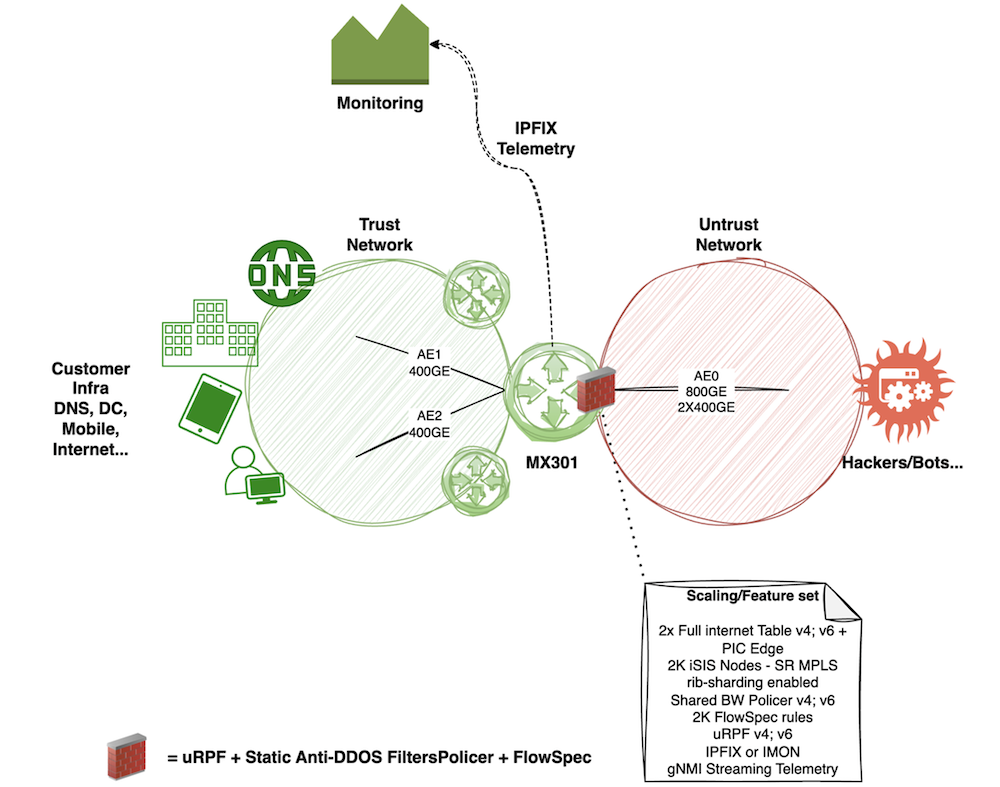
We use the following typical architecture, illustrated in Figure 2. In this architecture, certain devices sit at the boundary between two zones: a Trust Zone, which hosts critical customer resources, and an Untrust Zone, which is unmanaged from the customer's point of view. These devices should serve as the means of securely interconnecting these two worlds. In the lab, we simulated this role by adding this feature set on MX301:
- 800Gbps allocated for the trust and the untrust zones
- 2 times the BGP IPv4 and IPv6 Full view (we used official tables from [3])
- Rib-Sharding enabled
- IPv4 and IPv6 PIC Edge (Protect core)
- 2K ISIS nodes / ~10K ISIS routes (for the Trust Zone)
- Ingress IPFIX enabled with a 1:4000 sampling rate on all interfaces
- gRPC gNMI Streaming telemetry enabled (using OpenJTS [4] as collector)
Let's first review the current state and scaling figures on our MX301. We can start with the routing table summary - as shown, there are approximately 9K IS-IS routes, both the IPv4 and IPv6 BGP "official" Internet tables in the RIB, and 2K BGP FlowSpec entries.
The second command shows us the 2K ISIS nodes:
As configured below, the PIC-Edge feature installs both the nominal and backup paths in the FIB.
In practice, we only consume a single "unlist next-hop" - not twice the full views. Thanks to the Trio's NextHop hierarchy, this "unilist next-hop" handles the nominal/backup forwarding next-hop indirection and consumes only a few more ASIC memory. Let's verify this using a well-known Internet route:
As mentioned, we also rely on IPFIX for exporting flow statistics to an external appliance. IPFIX is configured as follows - we only show the IPv4 config, but the config would be the same for IPv6 and MPLS family.
With this configuration and scaling, RPD consumes about 5% of the RE memory. The heap memory of the "pseudo-FPC" reaches 41%, while the NextHop ASIC memory partition still has 73% free space:
How to Secure the Network?
In the previous section, we detailed our baseline. To build this "secure" gateway use case, we will use four main Junos features.
Note: Of course, there are other ways to secure a network architecture. BGP RTBH is one of the most popular, efficient, and simplest solutions to deploy destination blackholing at scale. However, in this article, we focus on a smarter approach that combines multiple Trio capabilities to mitigate various attack types against a destination while keeping it reachable.
- Unicast RPF (uRPF): for every packet entering the MX301 from an untrust interface, we will check the source IP address against the RIB (source lookup). uRPF provides only a basic, first-level source validation, which, by itself, is no longer sufficient from a security standpoint. But since Trio can easily support source lookup along with destination, without any performance degradation, why not add this feature to secure our infrastructure a bit more? We have the following three choices - in our example, we will select the third one, which offers a good compromise.
uRPF Strict Mode: BCP38 at the customer-SP edge. Each incoming packet is validated against the FIB. If the ingress interface does not match the best reverse path, the packet is dropped.
uRPF Loose Mode: sRTBH anywhere in the network. The router verifies only the presence of a route in the FIB. If no route exists, the packet is dropped; if a route is present, the packet is accepted. This mode is well-suited for sRTBH and for mitigating specific spoofed traffic at peering edges.
uRPF Feasible Path Mode: sRTBH anywhere in the network and BCP38 for multihomed or asymmetric environments. In feasible-path mode, the FIB retains multiple valid routes to a destination IP address. A packet is forwarded if its ingress interface matches any of these feasible paths; otherwise, it is dropped.
-
A set of static firewall filter terms and policers designed to mitigate well-known DDoS attack patterns. In practice, DDoS attacks are most often a combination of amplification attacks and dynamic attacks. Amplification attacks exploit vulnerabilities in well-known network services to generate large volumes of DDoS traffic, typically consisting of large UDP packets and fragmented payloads. Common amplification vectors include DNS and NTP service vulnerabilities but not only. The signature of these kinds of attacks is well-known. Why policing and not dropping those attacks instead? The challenge with the Amplification Attacks is that they use standard protocols that are very useful, like DNS. Dropping all the DNS traffic will bring you a lot of trouble, as you may imagine J. So, the idea with these static filters is to dramatically limit the load from these attacks and leave enough bandwidth in the nominal state for forwarding legitimate traffic associated with those network services.
-
BGP FlowSpec, together with its new FLT acceleration, is the third security mechanism used to precisely blackhole dynamic attack signatures, which are most often observed alongside amplification attacks (but not always). This approach provides a much more granular, targeted mitigation, allowing us to eliminate the remaining traffic from a complex attack. In this article, we use IPFIX as the flow observability protocol. IPFIX is enabled on all ingress interfaces and exports flow records to an external appliance, which quickly identifies dynamic attack signatures and generates corresponding BGP FlowSpec updates toward our security gateway. The details of this scrubbing solution are beyond the scope of this article.
-
Finally, we will leverage the Juniper Streaming Telemetry stack to monitor in real time all "data-plane" counters associated with the three previously described features. This allows monitoring and NOC teams to observe the benefits of each solution under different attack types in real time.
Putting our MX301 Under Attack
For now, let's assume that our MX301 has no security features enabled, except for BGP FlowSpec and the FLT acceleration described in our previous article [1]. We also assume that 2K FlowSpec routes,Äîof varying complexity,Äîare already installed. Their complexity is not a concern here, as we rely on FLT acceleration.
But, why this baseline of pre-installed FlowSpec rules? First, to stress a bit more the MX301, but we could also imagine this "customer" uses BGP FlowSpec not only to mitigate Dynamic DDoS attacks but also to blackhole some well-known illegal destinations/contents permanently.
Let's focus our eyes on these interfaces:
- Untrust interface: ae0 made of 2x400GE ports (one port per PFE)
- Trust interface: ae2 made of 1 single 400GE port.
As mentioned earlier, we have nothing fancy configured by default on these interfaces - just IPFIX to provide flow statistics to an external scrubbing center.
However, you may notice that we also configured "filter group 1" on both families of ae0. Why is that? Recall that FlowSpec is enabled by default on all interfaces. Here, we want to apply FS only on untrust interfaces. To achieve this, we assigned the arbitrary group ID "1" to those interfaces and explicitly bound FlowSpec to this group:
Based on this initial configuration, let's assume these legitimate flows constitute the traffic baseline. All flows are IPv4, but everything we will describe later in this article is fully applicable to IPv6.
| Flow | Direction | Throughput bps or rate pps | Traffic pattern | Description |
|---|---|---|---|---|
| Customer traffic downstream | AE0 to AE2 | 240Gbps / 30Mpps | IMIX | Typical Internet traffic |
| Customer trafficupstream | AE2 to AE0 | 100Gbps / 12Mpps | IMIX | Typical Internet traffic |
| Legitimate DNS traffic (to recursive DNS) | AE0 to AE0 | 200Mbps / 90Kpps | ~256 Bytes | Simulate "Internet DNS" responses toward the Customer Recursive DNS |
Table 1: Legitimate baseline traffic.
Why do we simulate legitimate DNS server traffic? The goal is to illustrate further the complexity of handling DNS amplification attacks. As is well known, the DNS infrastructure is highly distributed. In our example, we assume a fictitious customer operating both recursive and authoritative DNS servers. To briefly simplify the DNS workflow: the customer's recursive DNS server processes end-user DNS queries. It first checks its local cache and, if no entry is found, it recursively queries the DNS hierarchy (root servers, then authoritative DNS servers). These external DNS servers respond to the customer's recursive DNS queries, typically using source port 53. The customer's authoritative DNS server is responsible for serving records for the customer's own domain names. Let's consider our customer has 2 Recursive DNS VIP:
- 10.0.0.1/32
- 10.0.0.2/32
Also, remind you, we monitor via streaming telemetry the interface throughput that confirms everything is well forwarded:
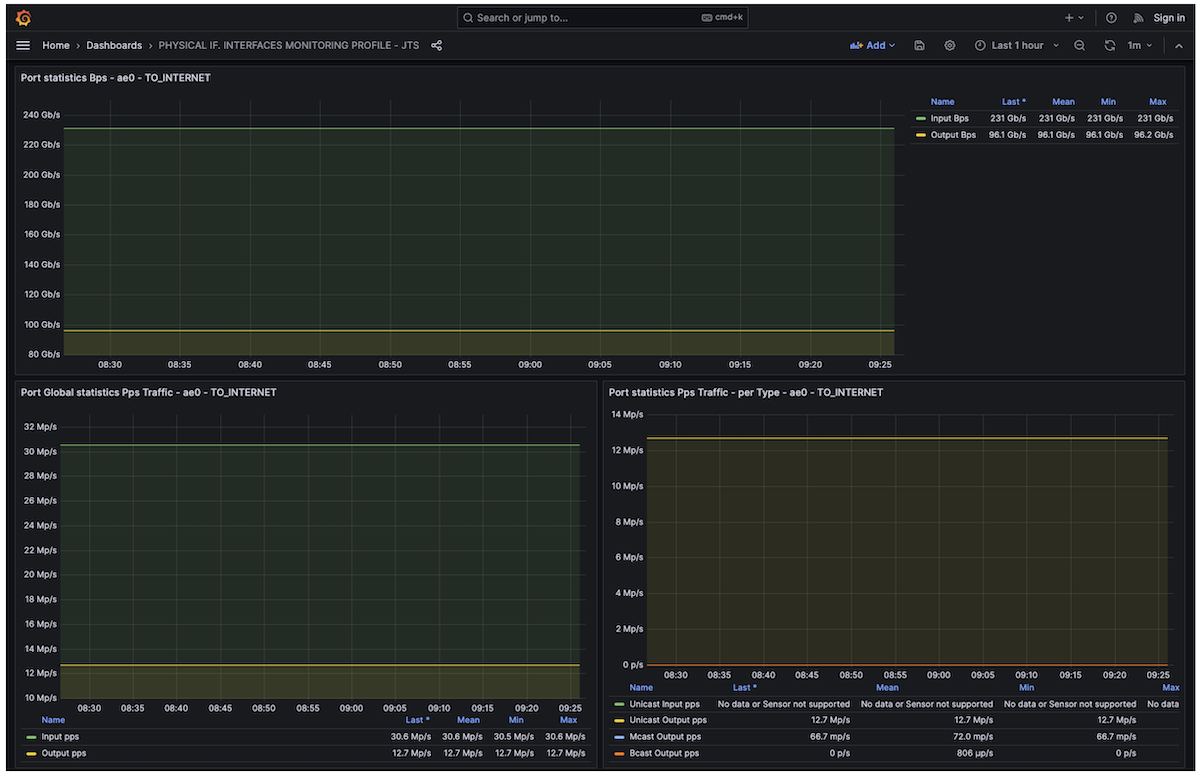
And our tester also monitors transmitted and received traffic - as seen below, everything is forwarded well:
| Type of traffic | Direction | Tx L1 Rate (bps) | Rx L1 Rate (bps) | Tx Rate (fps) | Rx Rate (fps) |
|---|---|---|---|---|---|
| Legitimate Downstream customer traffic | AE0 to AE2 | 240,022,896,663 | 240,022,904,892 | 30,460,810 | 30,460,792 |
| Legitimate DNS Traffic | AE0 to AE2 | 197,913,101 | 197,913,023 | 89,635 | 89,634 |
| Legitimate Upstream customer traffic | AE2 to AE0 | 99,999,999,667 | 100,000,010,902 | 12,690,791 | 12,690,692 |
Table 2: Baseline traffic statistics collected by the tester
Now, the idea is to simulate a complex DDoS attack by combining private IP address spoofing, DNS amplification, and dynamic TCP attacks.
Important note of the simulated attack: All these parallel flows will target a single IPv4 destination host located inside the customer's network. In this example, this host represents our critical resource under attack. Let's assume the IP address is 192.168.1.1/32 (in real life, this would be a public IP).
Here is the profile of the DDoS attack received on the ae0 interface:
| Flow | Throughput bps or rate pps | Traffic pattern |
|---|---|---|
| IP spoofing target | 7.3Gbps / 3Mpps | Size 256 Bytes - Random IP Source (IP Spoofed from customer's IP ranges) |
| DNS Amplification | 158Gbps / 13.3Mpps | Size 1500Bytes - UDP port source 53 |
| DNS Amplification | 158Gbps / 13.3Mpps | Size 1500Bytes (except the last frag) - UDP fragments (trailing packets of the DNS attack) |
| Dynamic TCP Attack | 72Gbps / 46Mpps | Random Size 128-256 Bytes - TCP random IP Source, Random Source Ports, 4 Destination Ports: 1024, 1025, 1026, 5000 |
Table 3: Flow attacks definition
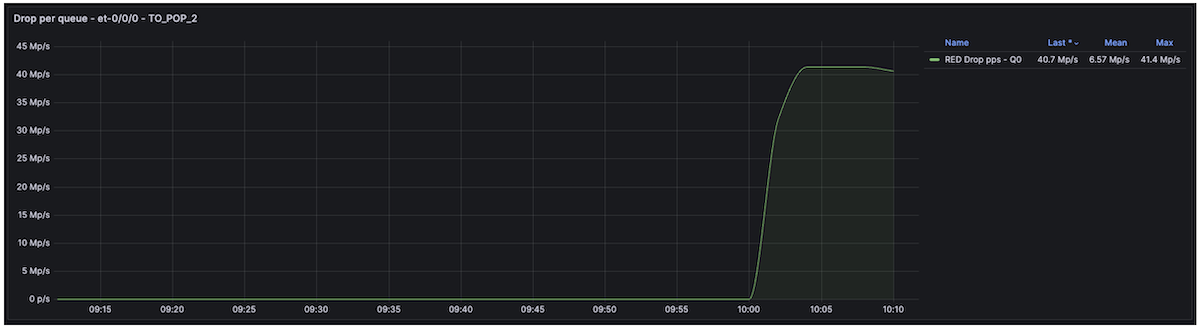
Let's start our attacks. As you can see below, the physical port et-0/0/0, a member link of the ae2 trust interface, is totally overloaded and experiences massive RED drops. This is expected, since ae0 receives more than 600 Gbps, while ae2 (the interface on which 192.168.1.1/32 is reachable) has a maximum capacity of 400 Gbps.
Thanks to the rich Junos data-plane telemetry sensors, we can confirm and monitor these drops. As shown below, we observe the "peak of traffic" on ae2, Queue 0 being full, and the RED engine working heavily by dropping a large amount of "Internet traffic."
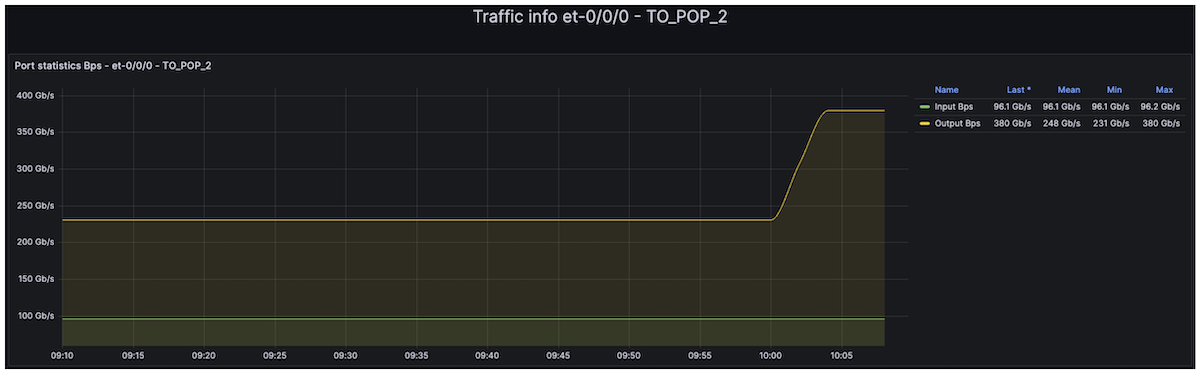
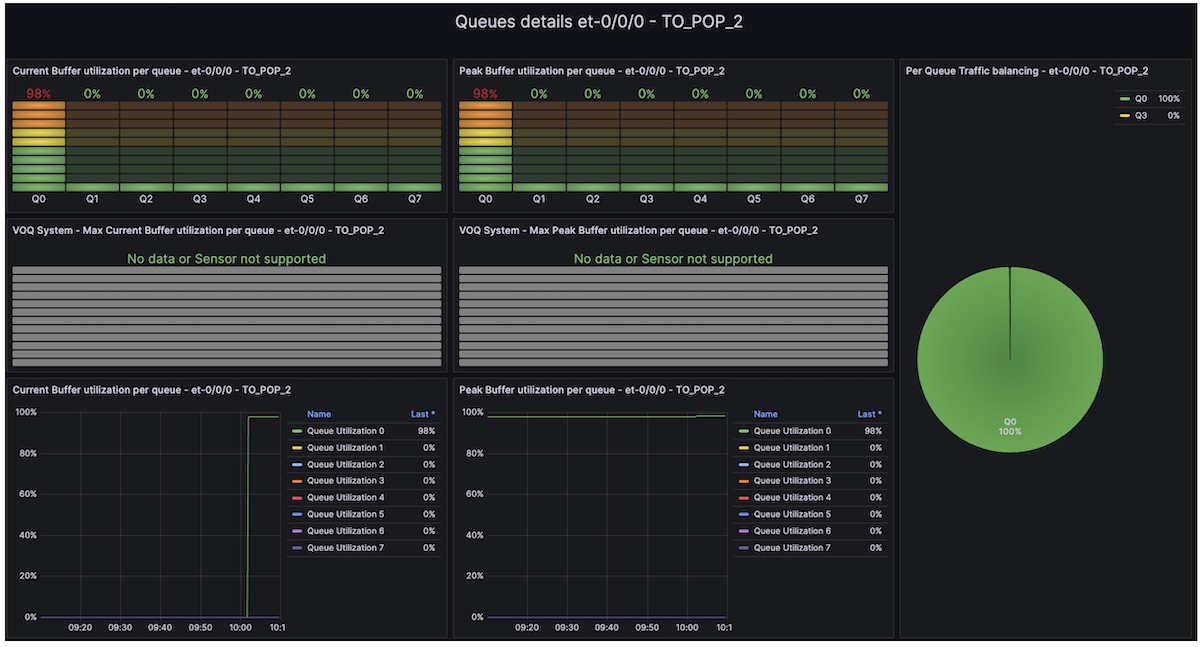
Now, if we look at the tester's statistics, we can confirm that this DDoS attack has a significant impact on our downstream legitimate traffic, including DNS traffic.
| Type of traffic | Direction | Tx L1 Rate (bps) | Rx L1 Rate (bps) | Tx Rate (fps) | Rx Rate (fps) |
|---|---|---|---|---|---|
| Legitimate Downstream customer traffic | AE0 to AE2 | 239,904,620,780 | 148,244,312,502 | 30,445,733 | 18,800,049 |
| Legitimate DNS Traffic | AE0 to AE2 | 197,912,101 | 72,002,114 | 89,632 | 32,610 |
| Legitimate Upstream customer traffic | AE2 to AE0 | 100,000,001,318 | 99,999,988,451 | 12,690,787 | 12,690,945 |
Table 4: Traffic impact measured by the Tester
Secure the Customer's Infra
Now, it's time to secure our trust infrastructure. First, we will enable uRPF strict mode with the feasible-paths option. As mentioned earlier, nowadays, uRPF does not help much, but why deprive ourselves of this feature if Trio enables it without compromise? It could help our customer to mitigate some IP spoofing attacks. Let's start by enabling the "feasible-paths" uRPF option globally:
Then, we create a dedicated firewall filter that applies the "discard" "log," and "count" actions for spoofed IP traffic.
Finally, enable IPv4 and IPv6 uRPF feature on Untrust interfaces (i.e. ae0):
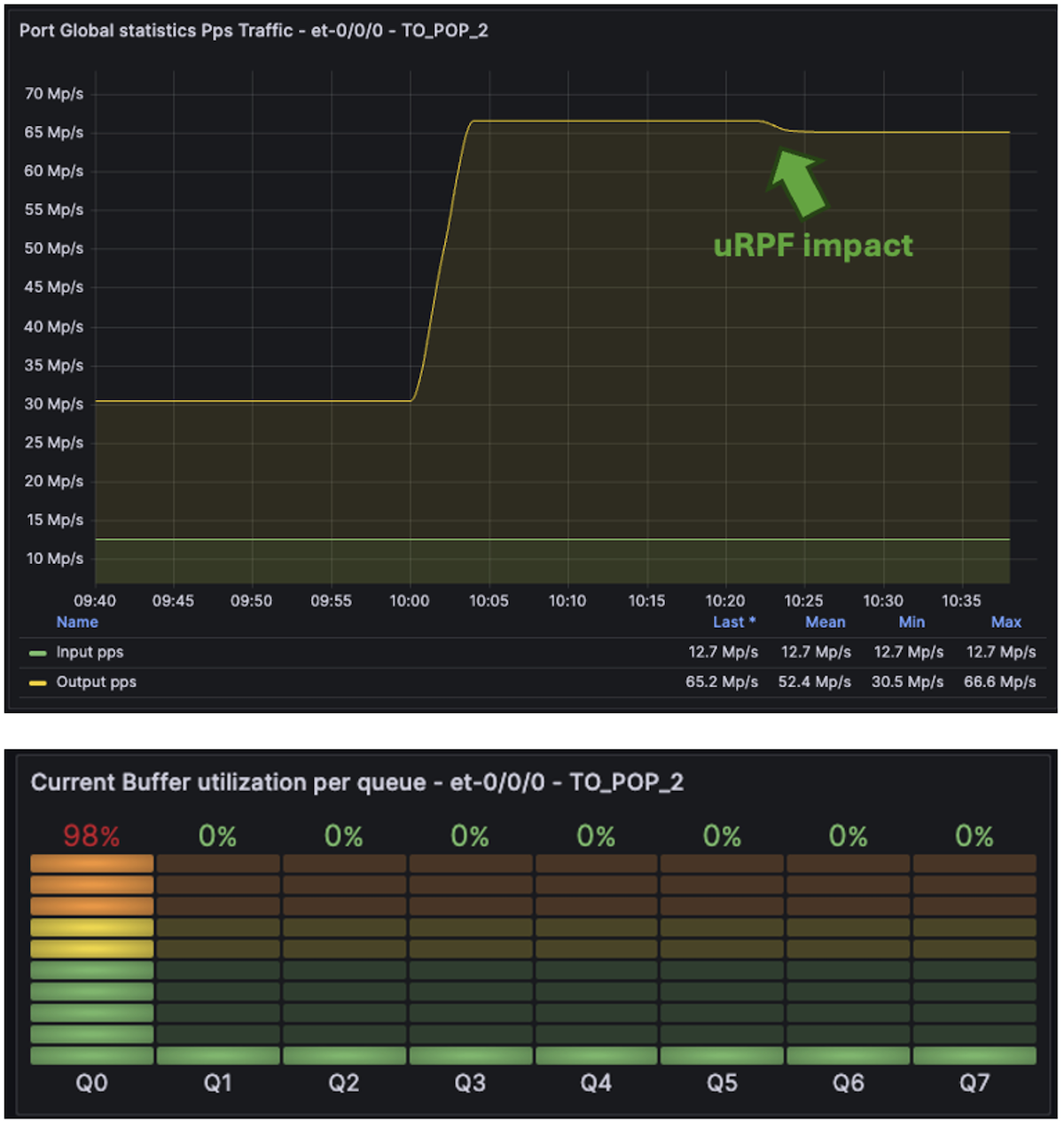
As shown, our legitimate traffic remains affected. The telemetry dashboard confirms that Queue 0 on the ae2 interface is still full.
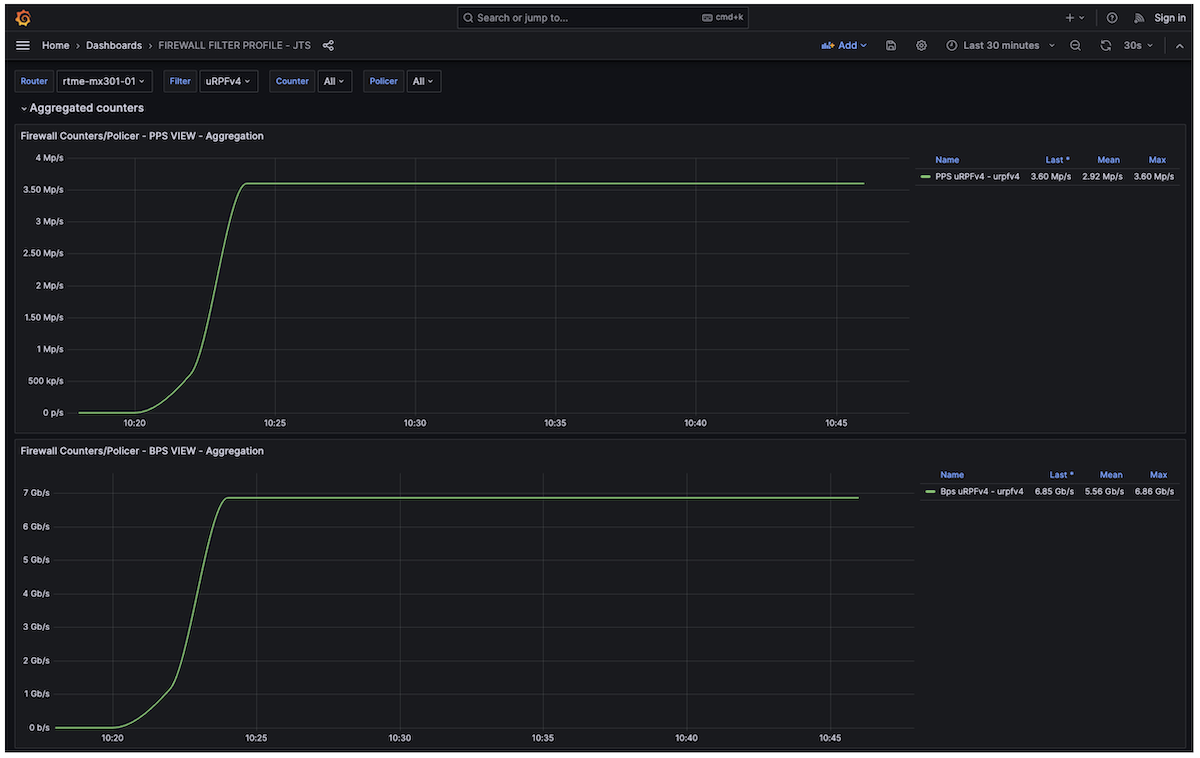
Nevertheless, if we switch to the Firewall Dashboard (using the Junos firewall filter sensor, which exposes all firewall counters and policer information), we can see that the uRPF filter is discarding ~3 Mpps of spoofed attack traffic. But this is not enough, as expected.
As we discussed earlier, most of today's attacks are a mix of well-known amplification attacks with well-known signatures and dynamic attacks with unpredictable signatures. How can we mitigate well-known amplification attacks? Based on my previous experience within a Service Provider NOC team, I share below a typical (non-exhaustive) list of well-known amplification attacks and their corresponding signatures. Moreover, several public articles also mention some of those attacks, for example [5] or [6]:
| Attack Type | Network Signature |
|---|---|
| DNS | UDP traffic sourced from port 53 (DNS amplification) |
| UDP-FRAGMENT | UDP packets that are IP fragments (protocol udp with is-fragment) |
| NTP | UDP traffic sourced from port 123 (NTP amplification/reflection) |
| UPNP | UDP traffic sourced from port 1900 (UPnP SSDP amplification) |
| CHARGEN | UDP traffic sourced from port 19 (CHARGEN amplification) |
| SNMP | UDP traffic sourced from port 161 (SNMP amplification) |
| ONCRPC | UDP traffic sourced from port 111 (ONC RPC / Portmapper amplification) |
| LDAP | UDP traffic sourced from port 389 (LDAP amplification) |
| MEMCACHED | UDP traffic sourced from port 11211 (Memcached amplification) |
| UDP-80 | UDP traffic destined to port 80, excluding source port 53 (non-DNS UDP floods toward HTTP services) |
Table 5: Some well-known DDOS Amplification Attacks
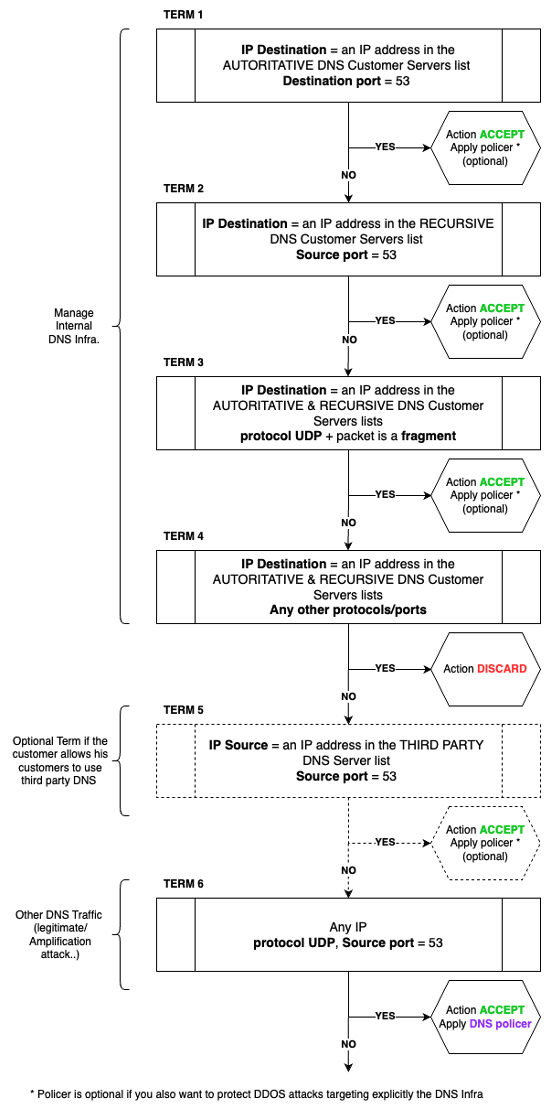
The DNS attack is among the most challenging. As mentioned earlier, we cannot "blindly" police DNS traffic, especially when customers host their own DNS services. During DNS attacks, we will rely on the pseudo-algorithm below to preserve as much bandwidth as possible for legitimate DNS services while policing traffic likely part of a DNS amplification attack.
How does it work? First, you need to create prefix-lists (v4 and v6), including IP ranges of the customer DNS infrastructure:
- A prefix-list for the Authoritative DNS servers: we chose DNS-AUTHORITATIVE and DNS-AUTHORITATIVE-V6 as prefix-list names.
- A prefix-list for the Recursive DNS servers: we chose DNS-RECURSIVE and DNS-RECURSIVE-V6 as prefix-list names.
Additionally, if the customer relies on third-party DNS or allows his customers to use well-known public DNS services (such as Google or Cloudflare), you could also create:
- A prefix-list for Third Party DNS servers: we chose the names DNS-THIRD-PARTY and DNS-THIRD-PARTY-V6 as the prefix-list.
Then, the algorithm is working as follows: it applies to both IPv4 and IPv6 DNS:
- Term 1: First, handle DNS traffic (UDP/TCP destination port 53) coming from the Internet/untrust zone and targeting the customer's authoritative DNS server(s) (serving the customer's domain name(s)). We use the "DNS-AUTHORITATIVE" prefix lists to match destination addresses. For this traffic, apply an "Accept" action and an optional dedicated policer (it may also be wise to rate-limit DNS traffic explicitly targeting the DNS servers to mitigate direct DNS server attacks).
- Term 2: Then, handle DNS reply traffic (UDP/TCP source port 53) coming from the Internet/untrust zone and targeting the customer's recursive DNS server(s) (replies to recursive requests initiated by the customer's recursive DNS servers). We use the "DNS-RECURSIVE" prefix lists to match destination addresses. For this traffic, apply an "Accept" action and an optional dedicated policer (again, it may be wise to rate-limit DNS traffic explicitly targeting the DNS servers to mitigate direct DNS server attacks).
- Term 3: Allow UDP fragmented packets targeting both the customer's recursive and authoritative DNS servers. For this traffic, apply an "Accept" action and an optional dedicated policer (it may be wise to also rate-limit DNS traffic explicitly targeting the DNS servers).
- Term 4: Drop all other traffic targeting the customer's recursive and authoritative DNS servers to protect your DNS infrastructure.
- Term 5 (optional): Handle replies (UDP/TCP source port 53) from well-known and customer-authorized third-party DNS servers hosted outside the customer network. We use the "DNS-THIRD-PARTY" prefix lists to match source addresses. For this traffic, apply an "Accept" action and an optional dedicated policer (it may be wise to rate-limit DNS traffic generated by well-known third-party DNS servers to mitigate spoofing attacks of public DNS server IPs).
- Term 6: The final term handles all other UDP-based DNS traffic, which represents most amplification attacks. However, it is not advisable to drop everything at this point. The goal of these static filters and policers is to reduce the blast radius of amplification attacks significantly. Therefore, the action is "Accept," but this time associated with a mandatory policer that rate-limits DNS amplification attacks.
Below is the IPv4 DDOS mitigation filter configuration. The first six terms relate to the "pseudo-algorithm" described above, and the following terms aim to mitigate the other simpler, well-known amplification attacks previously described in Table 5. You may notice that we also explicitly redirect all traffic to the BEST-EFFORT forwarding class, with an explicit ingress remarking of the DSCP value to 0.
Since this filter is applied on ingress untrust interfaces, we consider the traffic as untrusted. This is purely for illustration purposes and should not be taken as a recommendation.
1 2 3 4 5 6 7 8 9 10 11 12 13 14 15 16 17 18 19 20 21 22 23 24 25 26 27 28 29 30 31 32 33 34 35 36 37 38 39 40 41 42 43 44 45 46 47 48 49 50 51 52 53 54 55 56 57 58 59 60 61 62 63 64 65 66 67 68 69 70 71 72 73 74 75 76 77 78 79 80 81 82 83 84 85 86 87 88 89 90 91 92 93 94 95 96 97 98 99 100 101 102 103 104 105 106 107 108 109 110 111 112 113 114 115 116 117 118 119 120 121 122 123 124 125 126 127 128 129 130 131 132 133 134 135 136 137 138 139 140 | |
For the IPv6 filter instance, this is roughly the same; we share below one term to highlight the syntax differences:
The prefix-list definition on Junos is relatively well-known and standard. Remember, we mentioned at the beginning of the session that our customer had two recursive DNS servers. Here is how we configured the DNS-RECURSIVE IPv4 prefix-list. All the other prefix-lists followed the same configuration syntax:
For each policer associated with each term, it is up to each customer to select the best values based on their infrastructure, traffic levels, traffic forecast, etc. In our example, each policer is configured that way - 500 Mbps max.
Why the "shared-bandwidth-policer" knob? At that time, I highly recommend using this when you apply a policer to LAG interfaces. Indeed, a LAG may be composed of several member links spread across multiple PFEs, ASICs, or even line cards. Without this knob, each PFE receives the same policer value. For example, if you have a LAG with three member links, each attached to a different PFE, and you configure a policer at 500 Mbps, each PFE will enforce 500 Mbps, resulting in a total of 1.5 Gbps for the whole LAG; that is a behavior you could expect/want to have. If not, and you'd prefer to enforce the policer value from the LAG perspective, you need this policer option.
The system will automatically compute and update (when links are added, removed, or during flaps) the per-PFE policer value based on the number of PFEs and the number of ports per PFE in the LAG. This results in a derived policer value for each LAG and policer.
In the previous example, with three links across three PFEs, the system will instantiate a policer of approximately 166 Mbps per PFE. If one link goes down, the policer value is automatically updated to 250 Mbps per PFE. Even on the MX301, this is a valuable option, especially in our case, whereas our "Untrust" LAG ae0 has member links on two different PFE (Remember Trio 6 has two embedded PFE/Slices).
Let's apply our static filters on the ae0 ingress port and commit the changes.
Now, let's look at the egress interface statistics for ae2. As shown below, the static filters mitigation dropped most of the DNS amplification attack; only 500 Mbps of UDP 53 and 500 Mbps of trailing fragments have survived. But remember, the attack is complex and mixes dynamic flows. This is why we still observed some extra traffic forwarded toward the target of the attack. The AE2 interface is no longer under congestion, but since a subset of the attack is still forwarded, it does not mean there is no service impact. Indeed, we have been considering the attack, with all the different parallel signatures, as targeting a single destination: our 192.168.1.1/32 critical resource. If this resource hosts a critical public web portal or any other critical service, it is important to clean the remaining attack flows.
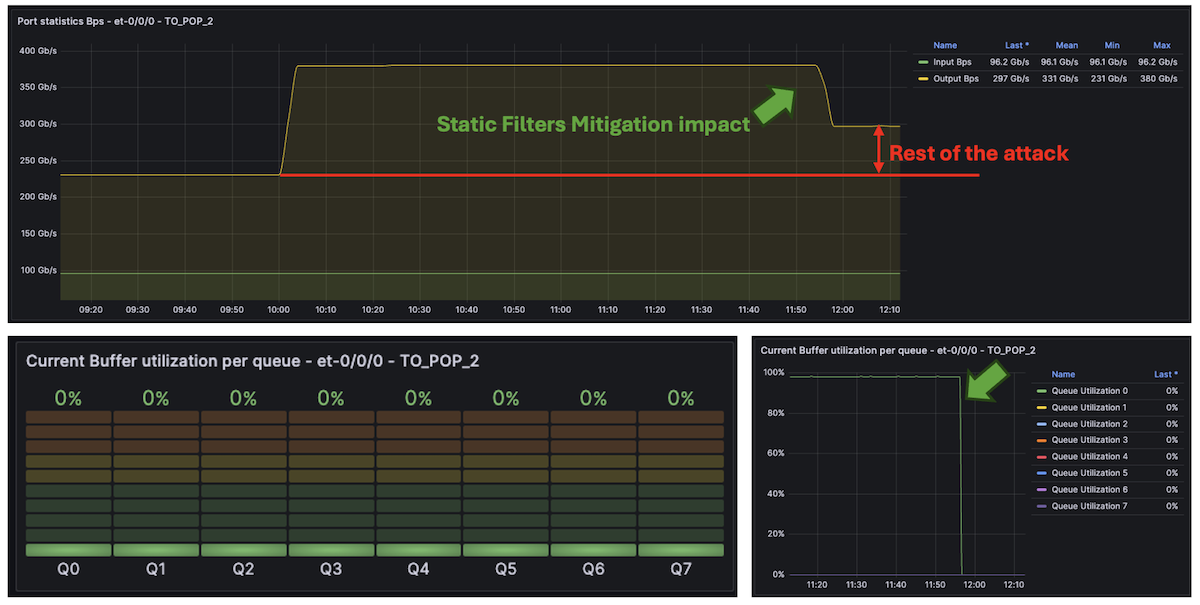
Before doing that, look at the tester results. As expected, that sounds better. The overall legitimate traffic is no longer impacted, and thanks to our DNS protection "pseudo algorithm", even though we heavily police DNS traffic (attacks), our legitimate DNS traffic between Internet DNS servers and our recursive DNS server remains safe.
| Type of traffic | Direction | Tx L1 Rate (bps) | Rx L1 Rate (bps) | Tx Rate (fps) | Rx Rate (fps) |
|---|---|---|---|---|---|
| Legitimate Downstream customer traffic | AE0 to AE2 | 239,904,625,976 | 239,904,551,270 | 30,445,773 | 30,445,853 |
| Legitimate DNS Traffic | AE0 to AE2 | 197,911,212 | 197,911,102 | 197,912,098 | 89,623 |
| Legitimate Upstream customer traffic | AE2 to AE0 | 100,000,000,350 | 100,000,007,927 | 12,690,808 | 12,690,808 |
Table 6: Legitimate flows status
To clean the remaining attack, we need to rely on an external solution to provide us with dynamic signatures. In our example, the MX301 exports IPFIX flow statistics to an external collector. We assume the external solution provides us with the attack signatures as fast as possible. On MX, the minimum flow-inactive-timeout and flow-active-timeout can be set to 10 seconds. If this is not fast enough, you may rely on the Inline Monitoring solution, which is cacheless.
Note: a solution like Corero, which is fully integrated with the MX portfolio, including the MX301, might be another way to detect and mitigate dynamic signatures, thanks to dynamic flexible match filters pushed into the ephemeral DB.
In our example, as we rely on IPFIX with a cache set to the minimum (10 seconds), the external solution should probably identify these signatures in 15 to 20 seconds:
- TCP Flood: 192.168.1.1/32 - Source IP: Random - Destination Ports: 1024, 1025, 1026, 5000 - Source Ports: Random
- UDP DNS: Destination IP 192.168.1.1/32 - Source IP: Random - Destination Ports: Random - Source Ports: 53
- UDP Fragments: Destination IP 192.168.1.1/32 - Source IP: Random
Once again, we assumed that the external solution would generate three FlowSpec rules covering these signatures and propagate them via BGP to our MX301. If we analyze the inetflow.0 table, we can see these three new rules, added to the existing 2K rules, which should completely clean the remaining attack:
Finally, we could look at the telemetry interface statistics:
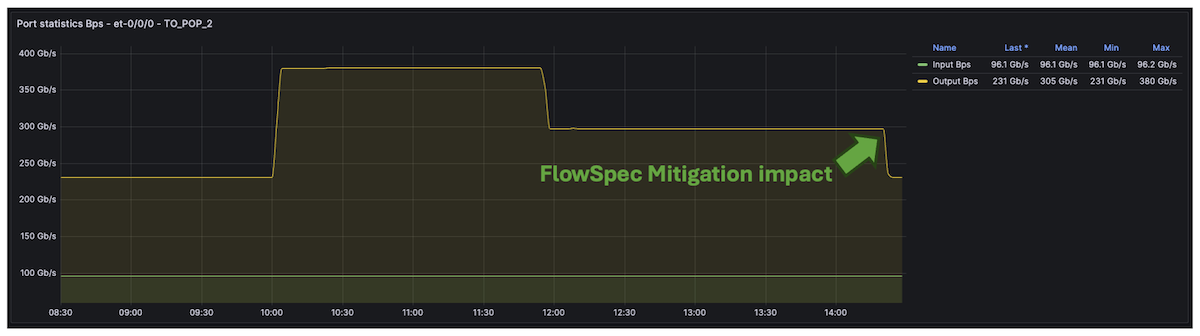
Also, by default on MX, FlowSpec route accounting is enabled, providing per-rule bytes/packets both via CLI and streaming Telemetry:
Note: if you don't need FlowSpec rules accounting, you could disable it by configuring: set routing-options flow no-per-route-accounting In our case, we kept this feature enabled by default, so we could leverage the telemetry solution to export those statistics:
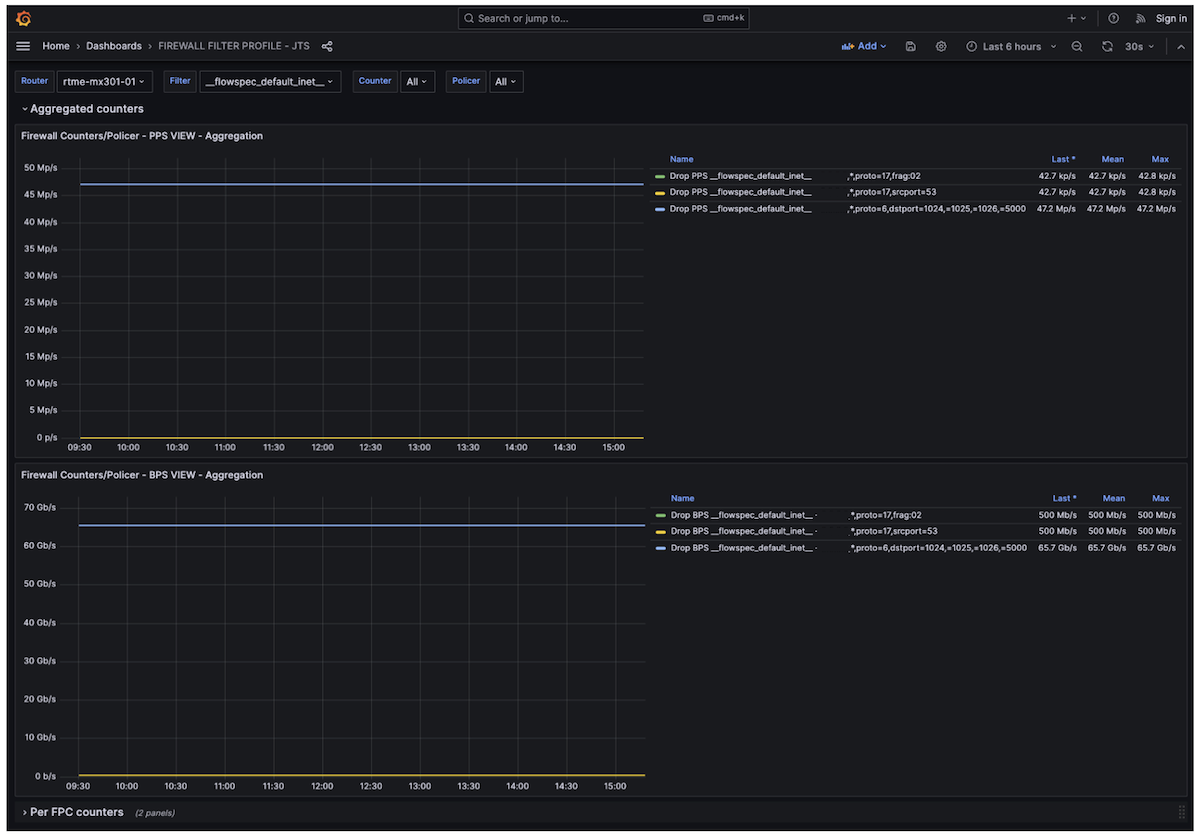
Remember, uRPF and static mitigation filters have no latency. Once the attack starts, these two initial filtering solutions work immediately. The dynamic signature mitigation could take more or less time depending on the flow protocol used (IPFIX, IMON, sFLOW,Ä), the detection mechanism, and the countermeasure approach used (BGP FlowSpec, dynamic filters,Ä).
The Cherry on Top of This Cake
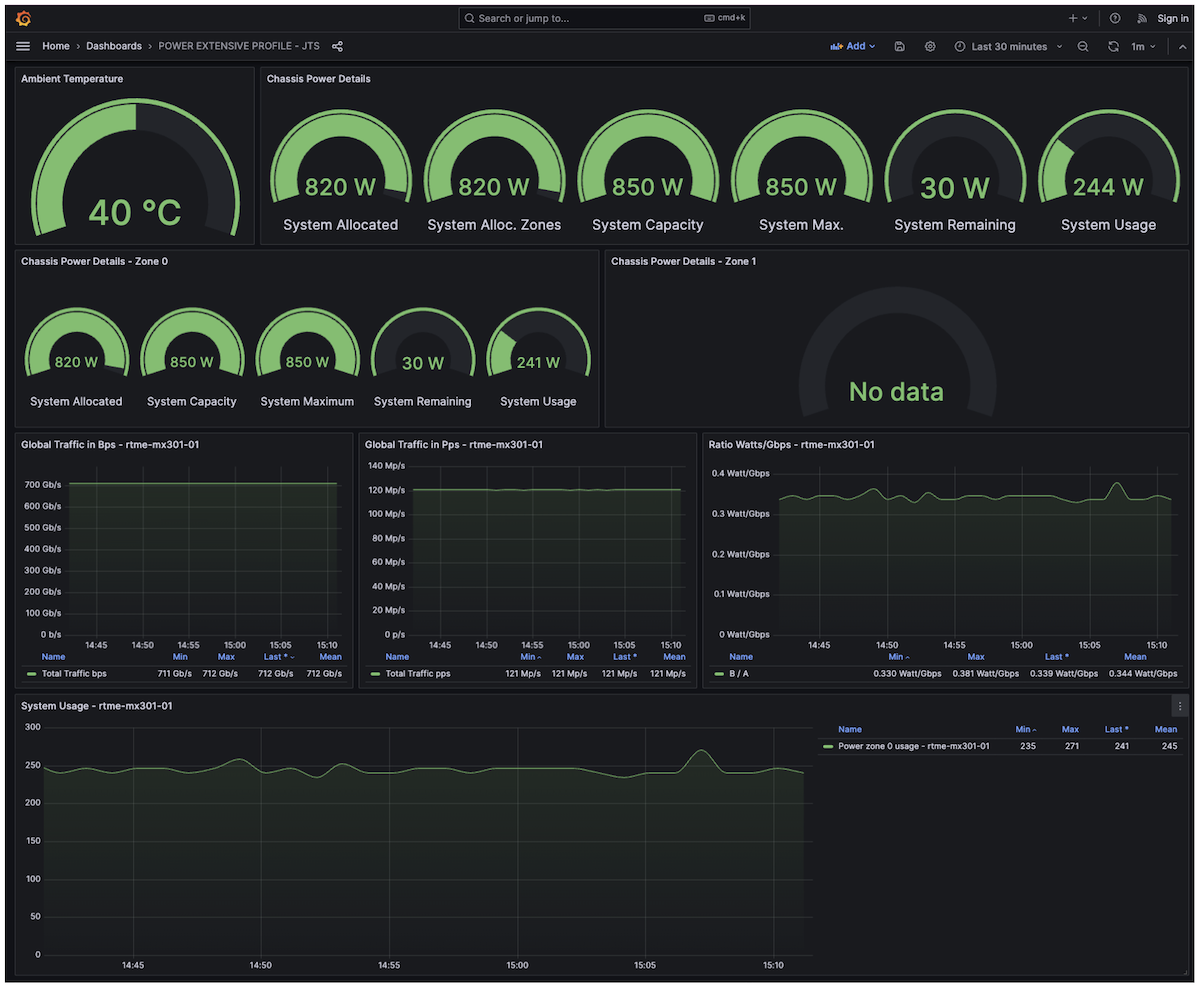
This last section is not directly related to filtering, but I wanted to wrap up the article with another touch of streaming telemetry and our newest MX301. Thanks to the "power monitoring" sensor, we can check the power consumption of the MX301 device while under attack, with all the discussed features enabled and at the current scaling + 50% of traffic - as seen below, that's pretty low, less than 250W (or ~0.35W/Gbps as shown on the graph)
Conclusion
In this article, we used the newest MX301 platform to illustrate a powerful improvement in Junos/Trio FlowSpec performance. We showed how to leverage this new feature, combined with other components of the Juniper filtering toolkit, to make the MX301 a flexible and robust secure routing gateway. The telemetry stack and rich data-plane sensors also provide real-time observability to NOC and 24/7 teams, enabling monitoring of the benefits of attack countermeasures and/or helping tune static policers over time. All of these features are fully applicable across the entire MX portfolio for both IPv4 and IPv6 traffic.
Links
- [1] https://juniper.github.io/techposts/mx301-high-performance-flowspec-without-compromise/article
- [2] https://juniper.github.io/techposts/mx301-deepdive/article
- [3] https://bgp.potaroo.net
- [4] https://github.com/door7302/openjts
- [5] https://fastnetmon.com/2025/07/30/understanding-volumetric-amplification-ddos-attacks/
- [6] https://qrator.net/library/learning-center/Ddos/What-Are-Amplification-DDoS-Attacks
Glossary
- AE: Aggregated Ethernet
- ASIC: Application-Specific Integrated Circuit
- BCP38: Best Current Practice 38 (ingress filtering to prevent IP spoofing)
- BGP: Border Gateway Protocol
- DNS: Domain Name System
- DSCP: Differentiated Services Code Point
- DDoS: Distributed Denial of Service
- FIB: Forwarding Information Base
- FLT: Filter (in "FlowSpec FLT Acceleration")
- FPC: Flexible PIC Concentrator
- FS / FlowSpec: BGP Flow Specification
- Gbps: Gigabits per second
- IMIX: Internet Mix (typical Internet traffic mix)
- IPFIX: IP Flow Information Export
- IPv4: Internet Protocol version 4
- IPv6: Internet Protocol version 6
- ISP: Internet Service Provider
- JFlow: Juniper Flow Monitoring (inline-jflow)
- L1: Layer 1 (physical layer)
- L2: Layer 2 (data-link layer)
- L3: Layer 3 (network layer)
- LAG: Link Aggregation Group
- LDP: Label Distribution Protocol
- LSP: Link-State Packet (IS-IS)
- Mbps: Megabits per second
- MPLS: Multiprotocol Label Switching
- MX: Juniper MX Series router
- NOC: Network Operations Center
- NTP: Network Time Protocol
- ONCRPC: Open Network Computing Remote Procedure Call
- PIC Edge: Prefix Independent Convergence Edge
- PFE: Packet Forwarding Engine
- QoS: Quality of Service
- RaaS: Routing as a Service
- RED: Random Early Detection
- RE: Routing Engine
- RIB: Routing Information Base
- RTT: Round-Trip Time
- RTBH: Remote Triggered Black Hole
- sRTBH: Source-based Remote Triggered Black Hole
- sFLOW: Sampled Flow
- SNMP: Simple Network Management Protocol
- SSDP: Simple Service Discovery Protocol
- TCP: Transmission Control Protocol
- UDP: User Datagram Protocol
- uRPF: Unicast Reverse Path Forwarding
- UPnP: Universal Plug and Play
- VIP: Virtual IP
- VRF: Virtual Routing and Forwarding