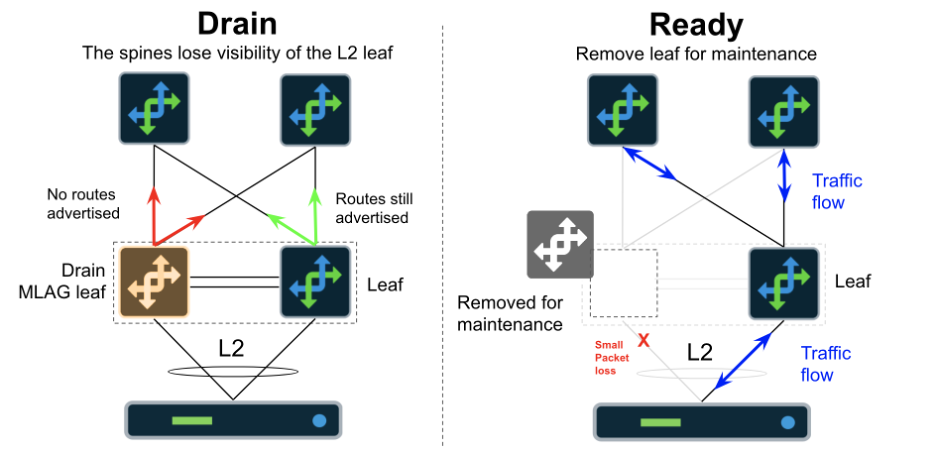
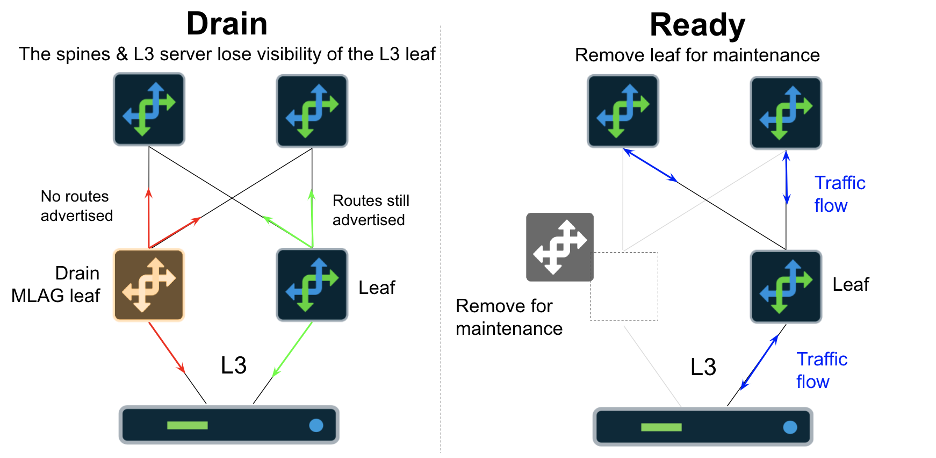
Apstra supports Drain Mode for managed switches, allowing the operator to gracefully drain traffic from devices without simply shutting down the BGP neighbor relationships.
This article is derived from original documentation by Josh Saul
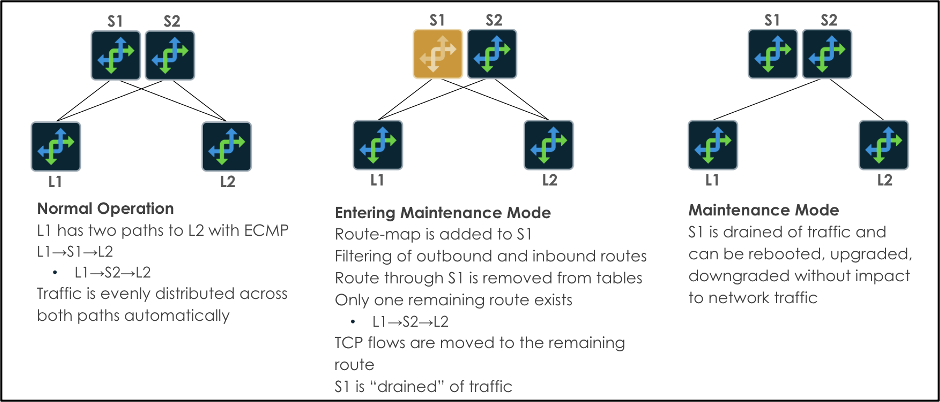
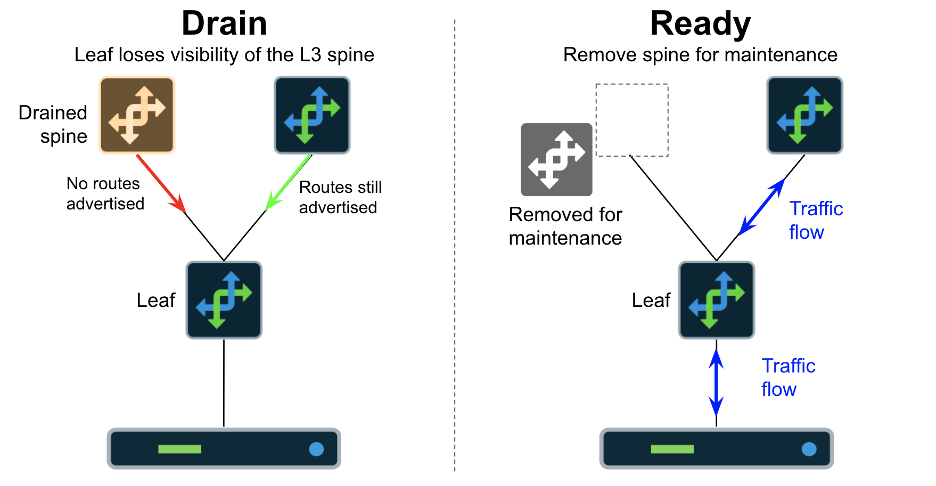
This is implemented through modifications to the BGP process (inbound/outbound route-maps) and shutting down connected L2 server ports and MLAG peer link ports. By using Drain Mode, operators can minimize the number of dropped/lost traffic during these operations. During maintenance, redundancy is handled by ECMP/MLAG as long as there are suitable redundant systems in place. A visual example of Drain Mode on Spine switches is displayed below:
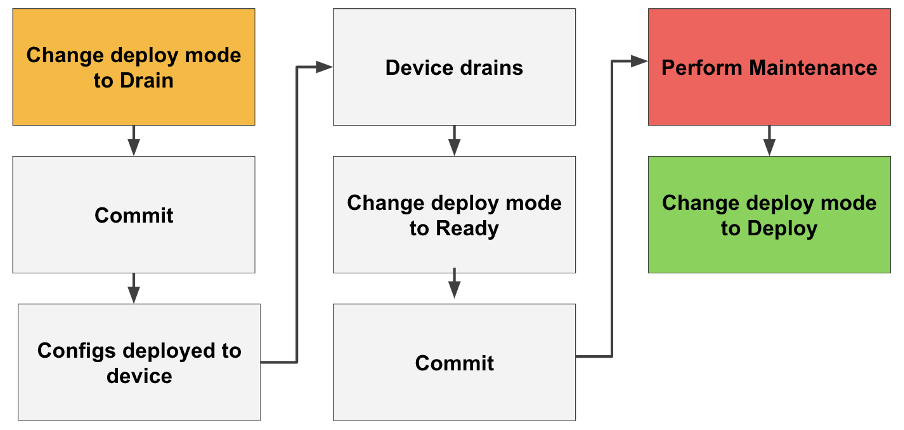
The workflow described in this document is summarized below:
You can activate a predefined IBA (Intent-Based Analytics) probe in Apstra, named "Drain Traffic Anomaly." The required value for Threshold in bps works as follows:
Value is the net sum of traffic on all hosted_interfaces
This does not include traffic on the Ethernet management port which is not part of the probe measurement
These interfaces include all L3 BGP-enabled paths
Server-facing interfaces are shut during Drain Mode and are not part of this calculation
The threshold describes the amount of traffic you wish to be alerted on (above the value) if devices are in the Drain state
This ensures that you do not perform actual maintenance operations on a device that has not been fully drained.
Spine1 is connected to 4 leaf switches, each connection runs the eBGP routing process. All application (server) based traffic flows will be rehashed via ECMP onto other links, the basic BGP neighbor updates will still be running. In a lab example with a small topology, this is effectively 1.5KBPS per link. With 4 neighbors, the total traffic we expect to remain on the devices is approximately 6KBPS. If we set the probe** Threshold in bps** to 10KBPS (10000), the probe will generate anomalies if there is more than 10K on all of the 4 interfaces combined.
Enable the probe with 100KBPS and leave it running in all blueprints. When a device enters the Drain state, you will see an anomaly as the traffic is removed from the links. This anomaly should only exist for a few seconds. If the anomaly does not clear, the device is not fully in Drain Mode. Once the anomaly clears, you can switch the device to the Ready state to take it out of service completely. You may not see the anomaly as it may appear and quickly disappear.
A route-map is placed on the Spine switch on all BGP neighbors, restricting inbound and outbound routes
What happens:
Outbound routes are removed from the device's routing table
Routes to destinations with the device's ASN in the AS_PATH are removed from all devices in the network
Packets are forwarded through the remaining ECMP paths for all destinations
It is highly unlikely that a single in-flight packet will be lost. However, this is dependent on the L3 ECMP to L2 path hashing algorithms in the hardware and NOS
A route-map is placed on all BGP neighbors restricting inbound and outbound routes
Server facing interfaces are shutdown
MLAG peer interfaces are shutdown
What happens (L3):
Outbound routes are removed from the device's routing table
Routes to destinations with the device's ASN in the AS-PATH are removed from all devices in the network
Packets are forwarded through the remaining ECMP paths for all destinations
It is highly unlikely that a single in-flight packet will be lost. However, this is dependent on the L3 ECMP to L2 path hashing algorithms in the hardware and NOS
What happens (L2):
The server interface to this device will go DOWN
Packets from the server that happen to be hashed onto this device via MLAG may be dropped depending on where they are in the forwarding process
Packets from the server that happen to be hashed onto this device via MLAG may be forwarded over the MLAG peer link depending on where they are in the forwarding process
Flows will be re-established on the alternate MLAG interfaces
New flows will be established on the remaining MLAG interfaces
Generically, draining a device before taking it out of service is a standard operational procedure. Done "by hand," it involves reconfiguring the device's BGP so that traffic is directed away from the device -- that is, BGP within a fabric sees the device as the least desirable next-hop to any destination. The practice ensures that packets in-flight through the device are delivered, while no new packets are sent through the device, minimizing packet drops before taking the deice out of service.
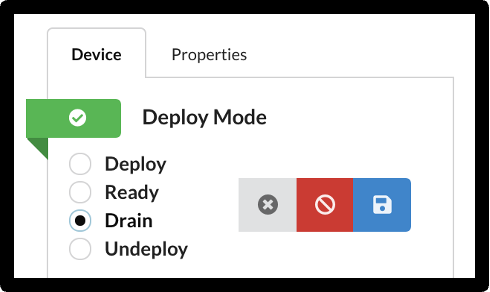
Juniper Apstra quickly and easily automates the drain process, triggering the necessary configurations with a simple button click to put the device in Drain Mode and letting you know through a predefined IBA probe when drain is completed, another click to undeploy the device, and another click to redeploy the device when maintenance is completed.